Warehouse Security
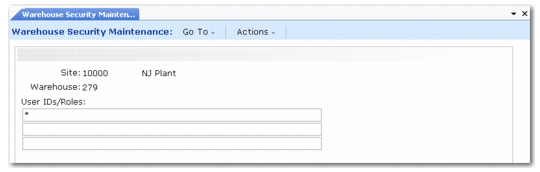
Warehouse Security Maintenance (4.23.13) enables you to control which users or groups of users can access data for a warehouse.
Warehouse Security Maintenance (4.23.13)
The frame contains three fields:
Site
Specify the site owning the warehouse being modified. Site security validation applies.
Warehouse
Specify the warehouse being modified. It must exist, in combination with the site, as a valid warehouse.
User IDs/Roles
Enter a list of user IDs or roles that can update data associated with this warehouse site. The system validates entries against records in User Maintenance (36.3.1) and Role Create (36.3.6.1).
Separate user IDs and roles with commas. Spaces are eliminated upon entry. Blank (the default) or an asterisk indicates all user IDs or roles. The exclamation point is used to restrict specific users by user ID. For example, the string ap, sales means only those users who were assigned the role of ap or sales have security access. Exclusions must be entered first. Specifying *, !user1 is the same as * (all roles).
Two further warehouse security options are provided:
• Warehouse Security Browse (4.23.14) enables you to review the security levels set for a specific warehouse.
• Warehouse Security Report (4.23.15) enables you to print a report showing users/roles for a specific warehouse or all warehouses.