QAD 2017 Enterprise Edition
>
User Guides
>
Warehousing
>
Processing Transactions
>
Processing Picking Transactions
Processing Picking Transactions
As with receipts, picking transactions are governed by the internal routing for the specific transaction. In addition, you need to define in advance a set of rules governing how inventory is picked for each transaction, known as picking algorithms.
For full details of the setup procedures for transactions, refer to
Algorithms.
The following is a brief outline of what you must define:
• Define the items to include in the pick using Item Master Maintenance (1.4.1).
• Define the picking properties for the transaction type and the storage location group. The main points are:
• Picking Levels: The minimum and maximum amount of inventory that can be picked from a location. These can be set for the warehouse, the default warehouse transaction type, the storage location group, and the transaction type.
• Over Pick: whether you can pick more inventory from a location than is specified in the order.
• Allow Split: whether the UM for a storage location group can be split for an order; for example, whether a pallet can be split into boxes for an order.
• Pick by multiple UM: Whether to allow picking in different UM—for example, both pallets and boxes to meet an order.
• Allow Multiple Transactions: Whether the system should create one transaction for the whole quantity to be picked, or allow multiple transactions using Storage Location Group Maintenance (4.3.1).
Example: If Pick Multiple UM = BX, and one BX = 20 EA in the receipt, then allow multiple transactions could result in two transactions of 20 EA; while not allowing multiple transactions would result in one transaction of 40 EA.
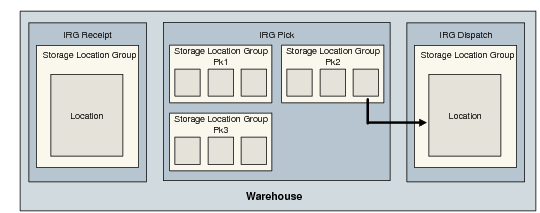
• Define the internal routing for the transaction using Internal Routing Maintenance (4.2.5). The simplest would be a two-step movement from Bulk to Dispatch.
• Assign the internal routing to a transaction type using Internal Routing Assignment Maintenance (4.2.9).
• Assign a location-find and picking algorithm to the transaction type using Algorithm Routing Maintenance (4.6.9).
When you create an order, the following occurs:
1 The system looks for the site/warehouse/location from which the inventory can be picked.
2 The algorithms for the transaction type are run until the quantities specified in the order have been picked.
3 Open sales order inventory pick transactions, which are two-phase transactions, must be confirmed by one of the movement confirmation functions. Confirming such transactions records that the movement of inventory to the appropriate dispatch dock has been completed. The picked stock can then be shipped against the order for which it was picked. Single-phase transactions do not go through this process.
The picking flow described here specifically for sales orders is also used in all functions where picking is performed, such as work orders, distribution orders, and the repetitive modules.