QAD 2017 Enterprise Edition
>
User Guides
>
Warehousing
>
Order Management
>
Control Settings
Control Settings
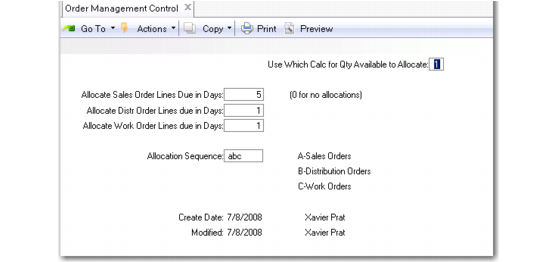
Use Order Management Control (4.13.24) to specify parameters for allocating items for sales, distribution, and work orders. You can specify:
• The number of calendar days from the sales order due date by which the system allocates work order line item
• Calculations for allocations
• The sequence in which the system allocates order lines
.
Order Management Control (4.13.24)
Use which Calc for Qty Available to Allocate
Enter 1, 2, 3, or 4 to select the method the system uses to calculate the quantity of items available to allocate for an order. The default is 1.
1: Quantity Available to Allocate = Qty Available – Qty Allocated
2: Quantity Available to Allocate = Qty Available – Qty Allocated + Qty On Order
3: Quantity Available to Allocate = Qty Available – Qty Required
4: Quantity Available to Allocate = Qty Available – Qty Required + Qty On Order
Allocations reserve inventory for an order, so it is not available for other orders in the system. When you enter an order, the system compares the order quantity to the quantity available to allocate. If available quantities are insufficient, the order cannot be filled, although allocation functions do not prevent you from entering a confirmed order line.
For most business situations, calculation 1 is recommended. This calculation includes orders due to ship within the time set in Allocate Sales or Distr Order Lines Due in Days and manufacturing orders that have been released to the shop floor. This calculation does not consider future requirements or supply sources.
Calculations 2, 3, or 4 are not time sensitive. The system includes all orders regardless of due date. For example, when you enter a sales order due in 6 months, calculations 3 and 4 subtract the order total when calculating current availability. When you enter a work order due to be completed in 6 months, calculation 2 adds the total to quantity available. Therefore, it is recommended that you use calculations 2, 3, or 4 only if you have a very short cycle time and planning horizon.
Allocate Sales Order Lines due in Days
Enter the number of calendar days from the sales order due date by which the system allocates sales order items. The system creates allocations for any orders due within this number of days.
Allocate Distribution Order Lines due in Days
Enter the number of calendar days from the sales order due date by which the system allocates distribution order line items. The system creates allocations for any orders due within this number of days.
Allocate Work Order Lines due in Days
Enter the number of calendar days from the sales order due date by which the system allocates work order line items. The system creates allocations for any orders due within this number of days.
Allocation Sequence
Enter the sequence in which the system allocates order lines. For example, abc means that the system allocates sales orders, then distribution orders, and finally work orders.