QAD 2017 Enterprise Edition
>
User Guides
>
Warehousing
>
Order Management
>
Generating Allocations for Orders
Generating Allocations for Orders
Use Order Warehouse Allocations (4.13.17) to generate general allocations for selected sales, work, and distribution orders. Allocations reserve inventory for shipment on confirmed orders, so it is not available for other orders in the system.
• General allocations reserve only the quantity needed at a particular site.
• Detail allocations set aside specific quantities by location, lot/serial, or reference numbers. Detail allocations are created automatically when picking.
Allocations also control shipment quantities when you cannot fill all orders. You can choose to ship the quantity allocated or the quantity picked.
The system calculates quantity available to allocate based on the calculation method specified in Order Management Control. The calculation is the same for all items and sites. The system only allocates inventory to order line items due within the number of days specified in the Allocate SO, DO, or WI Days into Future fields.
Using allocations is optional but recommended. Allocations and printed picklists give you control over which orders are shipped and when inventory can be allocated. Inventory balances are not decreased until a shipment is processed.
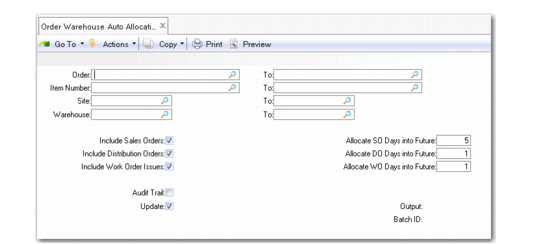
Order Warehouse Auto Allocations (4.13.17)
Most fields are similar to those found throughout QAD Warehousing programs. Unique fields are described in the following topics.
Include Sales Orders
Indicate Yes to include sales orders with items to allocate.
Include Distribution Orders
Indicate Yes to include data from distribution orders with items to allocate.
Include Work Orders
Indicate Yes to include work orders with items to allocate.
Allocate SO Days into Future
Optionally, enter the number of calendar days until cutoff date for allocating sales orders items. Use this field to manually control allocations. The system allocates inventory only to line items due within this number of days.
Allocate DO Days into Future
Optionally, enter the number of calendar days until cutoff date for allocating distribution orders items. Use this field to manually control allocations. The system allocates inventory only to line items due within this number of days.
Allocate WO Days into Future
Optionally, enter the number of calendar days until cutoff date for allocating work order issue items. Use this field to manually control allocations. The system allocates inventory only to line items due within this number of days.