Approving Selected Order Lines
Use Bulk Pick Selection Approval (4.14.4) to approve a set of order lines that you have previously selected for a bulk pick, and to create bulk pick transactions for them.
When you approve selected order lines, you change the status from S to A (approved). Once approved, the system creates detail allocations, bulk pick details, and warehouse transactions. When you approve selected work order components, you can upgrade the approved work order’s status to R (Released).
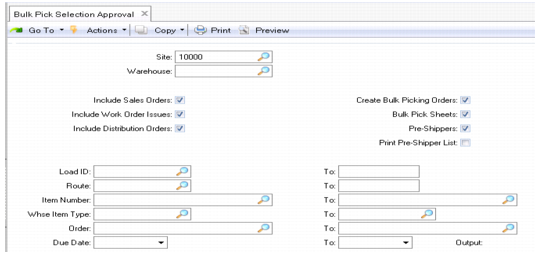
Bulk Pick Selection Approval (4.14.4)
Site, Warehouse
Enter the site and warehouse.
Sales Orders, Work Order Issues, Distribution Orders
Select the type of orders for the bulk pick.
Create Bulk Picking Orders
If set to No, standard picking is performed with each created detail allocation resulting in a separate warehouse transaction. If set to Yes (the default), a bulk picking order is created letting you regroup detail pickings for the same warehouse transaction. To do this, you must first define a valid bulk pick sequence ID in Bulk Picking Control (4.14.24).
Bulk Pick Sheets
If set to Yes, a Bulk Pick Sheets Report is printed.
Pre-Shippers
If set to Yes, pre-shipper IDs are generated and assigned to each sales and distribution order line.
Print Pre-Ship List
If set to Yes, the Pre-Shipper List Report is printed after you exit the program.
Load ID, Route, Item Number, Whse Item Type, Order, Due Date
Optionally enter a range of load IDs, routes item numbers, item types, orders, and due dates for previously selected order lines for approval.
Depending on the type of orders selected for approval, another frame with additional fields displays. The settings for the fields defaults from Bulk Picking Control:
• If the Auto All Sales Orders field is Yes, the system performs general allocation for sales order lines that are not yet general allocated at the time bulk picking process is run.
• If Allocate Components is Yes, the system automatically applies pick logic and creates detail inventory allocations for components of configured kits.
• If Override Partial OK is Yes, the system overrides the sales order Partial OK field setting in Sales Order Maintenance (7.1.1).
• If the Release Work Orders field is Yes, approved work orders are released (status set to R).
Once you have selected the output method, the system creates the pick transactions for the order lines, and prints the pick sheets.