QAD 2017 Enterprise Edition
>
User Guides
>
Warehousing
>
Bulk Picking
>
Shipping Bulk Pick Orders
Shipping Bulk Pick Orders
The following topics describe the main processes involved to prepare bulk-picked items for shipping.
Shipment Flow
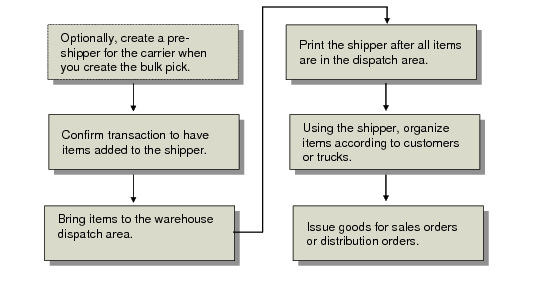
The following diagram depicts the main shipping flow for bulk picked orders.
Shipment Flow
Use Bulk Picking Shipping Forecast (4.14.18.10) to print the necessary documentation to send it to the carrier who prepares the truck shipments.
In Bulk Pick Order Selection (4.14.1), if Pre-Shippers is Yes, a pre-shipper document is generated when you save the information you enter in the bulk-pick selection frame.
You can reprint this document in Bulk Picking Pre-Shipper Print (4.14.18.4) for a certain pre-shipper, helping you with the packing of all the confirmed items. By adding the number of pallets and boxes, you automatically get the total ship weight for your pre-shipper.
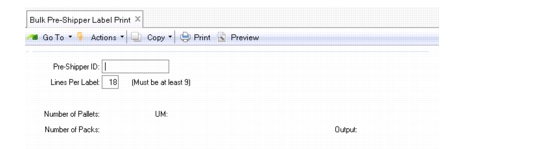
Use Bulk Pre-Shipper Label Print (4.14.18.4) or Bulk Pre-Shipper/Shipper Labels (4.14.18.15) to print shipping labels. Use Bulk Pre-Shipper Label Print in the same way as you would Sales Order Shipping Label Print (7.9.14), but specify bulk-picking pre-shippers instead of sales orders. If you print labels with Bulk Pre-Shipper Label Print, the system automatically calculates the total ship weight.
Bulk Pre-Shipper Label Print (4.14.18.4)
Obtaining Shipper Numbers
Since bulk pick details are deleted when the transaction is confirmed, you can obtain shipper numbers to use from SO Warehouse Data Maintenance (4.13.3), DO Warehouse Data Maintenance (4.13.6), or Order Warehouse Detail Report (4.13.12).
When Bulk Pick History is Yes in Bulk Picking Control (4.14.24), you can also use Bulk Pre-Shipper/Shipper Inquiry (4.14.18.13) or the programs included in the Bulk Picking History Menu (4.14.21) to find shipper numbers.
Issuing Goods
Once your pre-shipper or shipper is complete for the bulk-picked orders, you issue the goods using the standard system Pre-Shipper/Shipper Confirm (7.9.5) or DO Pre-Shipper/Shipper Confirm (12.19.13). Pre-Shipper/Shipper Confirm transforms pre-shippers to shippers and creates, posts, and prints invoices for sales orders based on the shipments.