QAD 2017 Enterprise Edition
>
User Guides
>
Warehousing
>
Bulk Picking
>
Archiving/Deleting Empty Bulk Picks
Archiving/Deleting Empty Bulk Picks
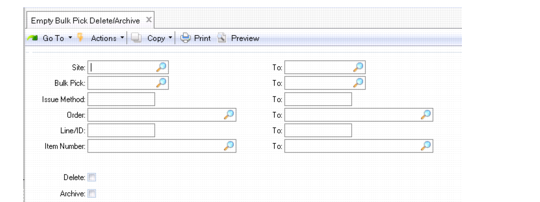
Use Empty Bulk Pick Delete/Archive (4.14.23) to delete or archive bulk picking data no longer needed. When bulk pick details are created for memo items (memo issue method), the system does not create warehouse transactions; therefore, memo item data displays in inquiries and reports until you delete the data using Empty Bulk Pick Delete/Archive.
You can set the Delete field to No to display the data first. Once you view bulk picking data, you can set Delete to Yes to delete it, or set Archive to Yes to archive the data to a file you specify in Archive File. You specify bulk picking data to delete/archive by a range of sites, bulk picks, issue methods, orders, lines, or item numbers.
Empty Bulk Pick Delete/Archive (4.14.23)