Batch Picking Control Options
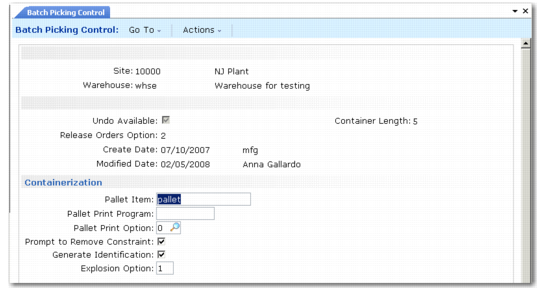
You can set up the system so that it generates container IDs, prints labels for a pallet, prompts to remove containers, and so on during containerization. To do this, use settings in the Batch Picking Control (4.15.24) Containerization frame.
Batch Picking Control (4.15.24), Containerization Frame
Pallet Item
Enter the default pallet container item. You must define the container item first in Item Maintenance (1.4.1).
Pallet Print Program
Enter a print program to use when printing labels for pallets. The default program is whprtpal.p.
Pallet Print Option
Indicate whether pallet labels print automatically, not at all, or if the system prompts to print labels. You must specify the print program in Pallet Print Program. The system prints labels for pallets that do not already have a label.
0: Never print pallet labels.
1: Always print pallet labels.
2: Prompt RF user to print pallet labels.
Blank Reference
Indicate whether the system retains the pallet reference number or blanks the reference number when RF users confirm a transaction when the Container/Reference field in Batch Picking Control is set to Container.
Typically, it is ideal to have a blank reference on the RF when warehouse staff scan a tote to populate the pre-shipper.
Prompt to Remove Container
Indicate if you want the system to prompt RF users to remove a container. If users respond to the prompt with Yes, the box is removed from the pallet. When you view the shipper structure in Order Warehouse Detail Status Inquiry (4.15.4.1), the display shows the box below the shipper level, instead of below the pallet. When you remove all boxes in a pallet, the system automatically deletes the pallet and moves all items below the shipper level for the pallet.
No (the default): The system removes the box from the pallet without prompting warehouse staff for confirmation.
Yes: The system prompts warehouse staff to remove the box from the pallet.
Generate Identification
Specify whether the system generates a new container ID when warehouse staff use the RF Container Build menu option.
No: The system does not generate a new container ID.
Yes: The system generates a new number during RF containerization. You should set up pallet label printing if the system generates new numbers.
Generating a new ID can lead to errors if warehouse staff accidentally press Return in the RF containerization process and Generate Identification is set to Yes. The system considers stock to be on the newly generated pallet number while it may actually be on a different pallet ID.
Explosion Option
Specify whether the system prompts the RF user to enter the number of boxes or splits the items into boxes when you explode a pallet.
0: The RF does not prompt the user to specify the number of boxes. The system splits goods into x boxes of y items, where x and y are values that the system calculates based on the item’s base UM conversion factor. You define the conversion factor in
Alternate Unit of Measure Maintenance (4.5.1). If the items cannot be split into boxes equally, the last box contains the remaining items from the conversion.
1: The RF prompts the user to enter the number of boxes into which the contents of the pallet are exploded.