Printing Pre-Shippers/Shippers
You can optionally print the pre-shipper/shipper for both sales and distribution orders from the RF. You can print before beginning the container move or truck ship process so that users can collect shippers before they pack the truck.
Before printing the pre-shipper/shipper, you must assign a form printer to the user who scans and loads the truck in User Work Location Group Maint (4.11.3.13). You can also assign a form printer to the work location group (WLG) in Work Location Group Maintenance (4.3.9).
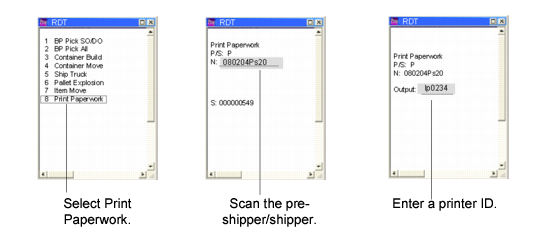
To print pre-shippers/shippers from the RF:
1 Select Print Paperwork (3.8) in the RF Picking/Container Menu (3).
2 Scan the pre-shipper or shipper ID.
3 Select a printer.
Print Paperwork Process