Undoing an Assigned Shipper Number
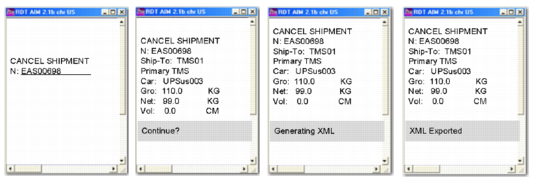
Use RF Cancel Shipment (3.9) to unassign a shipper number and change the document type from shipper to pre-shipper. You can only undo an unconfirmed shipper. Cancel Shipment allows RF users to:
• Convert shippers back to shippers by assigning the shipper’s old pre-shipper number.
• If specified in the Cancel Shipment (whtraxcx.p) field in Local Exit Routines Setup (4.23.10), a void shipment (VOID) message can be produced and exported to the TMS for cancelling a previous ship shipment (SHIP) message. This is necessary if you need to change the contents of the shipper once the shipper has been exported to the TMS. RF users must first execute Cancel Shipment and then modify the shipper. Once done, it is possible to produce the shipping label document by using Print Paperwork again.
RF Cancel Shipment
When you undo a shipper number, the original pre-shipper number is reassigned. This can occur only if NRM permits the discarding of the associated sequence number. If the sequence number cannot be discarded, the shipper is not rolled back, although the system can send the void shipment message to the TMS.