Setting Up Truck Shipping
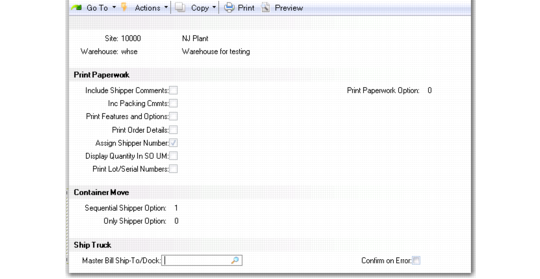
You set up truck ship in the Truck Ship frame in Batch Picking Control (4.15.24).
Batch Picking Control, Truck Ship Frame
Master Bill Ship-To/Dock
Specify the default ship-to/dock to be used in the RF Ship Truck option when creating master bills of ladings in Master Bill of Lading Maintenance (7.9.12.2). RF Ship Truck creates an MBOL that includes all shippers being confirmed; this is the ship-to/dock against which the system creates the MBOL.
Confirm on Errors
Specify whether RF Ship Truck option should confirm shipments when errors are received from a Transportation Management System (TMS).
No: If there is an error in the communication between QAD warehousing and the TMS, no shipments are confirmed. In this case you should use other system shipper confirmation programs to confirm shippers.
Yes: A warning displays, but you can proceed and confirm shippers.