Setting Up Load Optimization
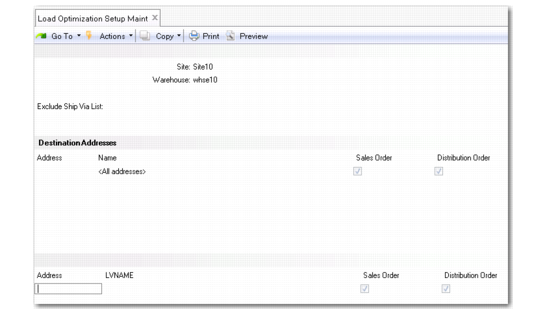
Use Load Optimization Setup Maint (4.15.2.1) to define default values for the Load Optimization field that displays in Order Warehouse Data Maint, SO Warehouse Data Maint, and DO Warehouse Data Maint. The ship-to addresses and items you define here sets the default for the Load Optimization field in these programs to Yes.
Key elements that define whether an order line should be processed for the TMS load optimization include:
• Ship-from site and warehouse
• Ship-to addresses
• Items
• Ship via carrier and service
The combination of these fields in an order line record determines the value of the load optimization as calculated by the TMS.
Use the following procedure to set up load optimization:
1 Enter the site and warehouse.
2 Specify carriers that should not be included in load optimization in the Exclude Ship Via List.
3 Select from a list of ship-to addresses to modify in the Destination Addresses frame or enter a new address.
Note: If Address is blank, all ship-to addresses go through load optimization.
4 Indicate whether sales orders or distribution orders for the ship-to address are included in load optimization, then cancel to display the Items frame.
5 Select from a list of items in the Items frame to modify a range of item numbers for which load optimization should apply or enter a new item range.
When you enter an item, the system sets the default for the Load Optimization field in QAD Warehousing SO or DO order maintenance programs to Yes. If Items is blank, all item numbers go through load optimization.
Note: When you are in the Items or Addresses frame browse, you can press F3 to get a additional Add options and F5 to get additional Delete options.
Load Optimization Setup Maint (4.15.2.1)
Exclude Ship Via List
Enter a list of carriers, separated by commas that should not be included in load optimization.
Address
Enter a ship-to address for order lines to include in load optimization. Entering the address here sets the Load Optimization field to Yes in Order Warehouse Data Maint, SO Warehouse Data Maint, and DO Warehouse Data Maint.
Sales Order
Indicate Yes to include sales orders for this ship-to address for load optimization.
Distribution Order
Indicate Yes to include distribution orders for this ship-to address for load optimization.
Item Number
Enter an item for which order lines will be included for load optimization via the TMS. The item must be defined within the QAD Warehousing Item Menu. Entering the item here sets the Load Optimization field to Yes in Order Warehouse Data Maint, SO Warehouse Data Maint, and DO Warehouse Data Maint.
Load Optimization in Orders
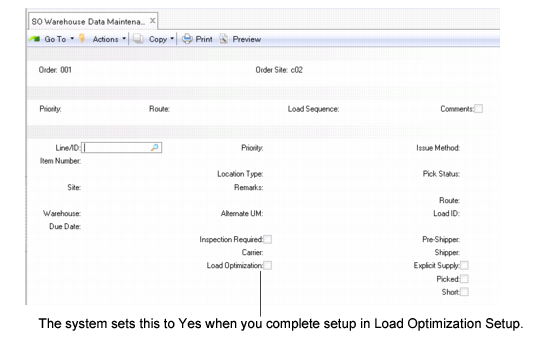
When you setup loads through Load Optimization Setup Maint, the system sets a Load Optimization field to Yes for sales orders in SO Warehouse Data Maintenance (4.13.3) and for distribution orders in DO Warehouse Data Maintenance (4.13.6). You can overwrite the Load Optimization field, though, in the orders.
When Load Optimization is Yes in any of the order data maintenance programs, the system makes the order line eligible for load optimization through a TMS.
Note: You can also use Order Warehouse Data Maint (4.13.1) if you specify the type or order first.
SO Warehouse Data Maintenance (4.13.3)
Load Optimization
Indicate if this order line is to be processed through load optimization functions in the Wave Transportation menu (4.15.2). The load optimization module works in conjunction with the wave planning module, which means that only sales and distribution orders can be selected for load optimization processing.
No: This order line is not included in load optimization.
Yes: The order line is pre-processed by a TMS prior to start the picking process in QAD Warehousing. The TMS either consolidates orders into shipments to reduce overall shipping costs or optimizes the loads by calculating routes with drop-off sequences. The TMS sends the optimized or consolidated loads back to QAD Warehousing for further processing.
You set up default load optimization parameters in Load Optimization Setup Maint. When you specify a ship-to address or an item in Load Optimization Setup Maint, the system sets this field to Yes at order entry.
When Load Optimization is Yes and QAD Warehousing is enabled, warehouse staff cannot pick for the order using Picklist/Pre-Shipper - Automatic, Distrib Order Picklist Print, or Sales Order Packing List.
You cannot set this field to Yes for sequenced customer schedules. You cannot change the value of this field if the picking process has already started for the order line that was selected for load optimization.