Specifying a Carrier
Use Carrier/Service Assignment Maint (4.15.2.13) to assign a carrier or shipping service to be considered for load optimization by a TMS. Typically, when the TMS analyzes your shipment information, it attempts to select the lowest cost carrier for shipments. It also considers lead time and the carrier you assign here for a particular shipment before selecting the best carrier or service to optimize the load.
You can optionally choose to enter values for the service or carrier to generalized codes for the abs_shipvia field once you enter either the carrier or service. Specify Yes at the system prompt to add values if you want either carrier or service values added to generalized codes.
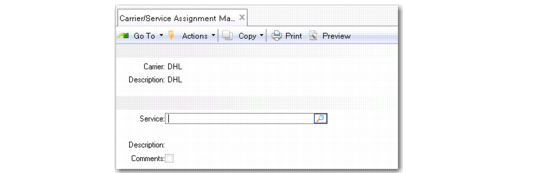
Carrier/Service Assignment Maint
(4.15.2.13)
Carrier
Specify a valid carrier defined in Carrier Maintenance to be considered for load optimization by the TMS.
Normally the carrier is defined in the TMS; however, depending on the setting you enter for generalized codes when prompted, you can create the carrier as a generalized code for the abs_shipvia field so that you can reference it in core system and QAD Warehousing data.
Service
Specify a valid carrier service to be considered for load optimization by the TMS.
Most TMSs distinguish a carrier from a service; for example, UPS is a carrier that offers different services, such as same day, next business day, and so on. The core system software and QAD Warehousing do not make this distinction—both use the shipvia field to reference either a carrier or a service. Use this field to make the distinction as the TMS can indicate that you need to send two shipments using two different services with the same carrier.
Comments
Optionally, add any comments about the carrier or carrier service.