Physical Inventory
Physical Inventory enables you to count and compare actual, on-hand inventory balances with on-hand quantities recorded in the system. This can also be done with cycle counting. Warehouse staff can conduct a physical inventory through the RF device within the warehouse.
To perform a physical inventory count, first determine the items you want to count and the count frequency. Each item to be counted must have a system-generated count tag, used to record item count information.
Typically, users of QAD 2009 EE use the programs in the Inventory menu (3.16) to perform these tasks:
1 Delete the tags from the previous physical inventory.
2 Freeze inventory balances.
3 Create and print tags.
4 Enter initial tag counts.
5 Review results and enter recounts if necessary.
6 Void/zero count unused tags.
7 Update inventory balances.
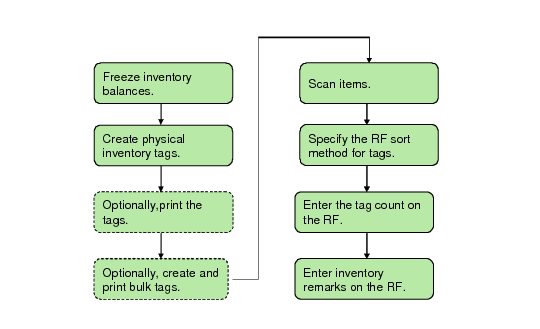
Physical inventories through the RF device differ slightly. Warehouse staff count quantities in the warehouse and record them directly into the system using the RF device. The device provides electronic information on what to count; however, staff can optionally print tags through the RF device. Steps for RF-device-conducted physical inventories are shown in the following flowchart:
Physical Inventory Flow
The following topics discuss each step.