QAD 2017 Enterprise Edition
>
User Guides
>
Warehousing
>
Quality Inspection
>
Using the .NET UI to View Inspection Data
Using the .NET UI to View Inspection Data
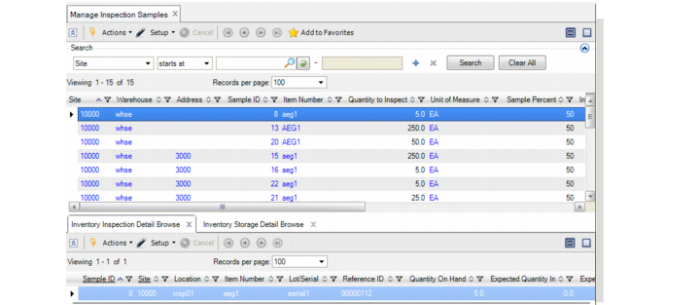
You can use a browse collection in the .NET UI to view inspection data. You can use Manage Inspection Samples to view all inspection samples, pending confirmation. The browse contains other supporting browses.
In the main browse, the Ready to Inspect field indicates whether staff moved material to the inspection area or not; that is, it shows whether the inspection warehouse transaction is confirmed or not. In the Inventory Inspection Detail Browse child browse, you can see the inventory details for material to be inspected. In the Inventory Storage Detail Browse child browse, you can see he inventory linked to an inspection sample that is already in the storage area.
You can right-click on the sample ID field in the main browse to access Sample Inspection Maintenance where you can enter the inspection results for a given sample ID directly into the maintenance program.
.
Manage Inspection Samples