QAD 2017 Enterprise Edition
>
User Guides
>
Warehousing
>
Messages and Alerts
>
Deleting and Archiving Messages
Deleting and Archiving Messages
Use Whse Message Delete/Archive to:
• Delete messages sent from QAD Warehousing to one or more users of the RF device.
• Archive messages.
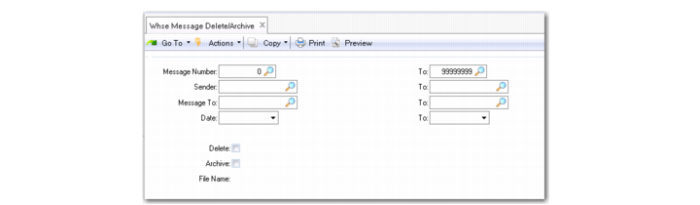
When you set Archive to Yes, the system supplies the name of the file with archived messages in the File Name field. You must set both Delete and Archive to Yes for the name to display.
Whse Message Delete/Archive (4.22.23)
Message Number
Enter the first system-assigned message number in a range to display. To view message numbers, senders/recipients, message dates, and message subjects, use Whse Message Browse.
Sender
Enter the first valid QAD EE user ID for the sender in a range for this function to consider.
Message To
Enter the first valid QAD EE user ID for the recipient in a range for this function to consider.
Date
Enter the first date in a range for the date that the message was sent to RF user/users.
Delete
Indicate Yes to delete messages from the system.
Archive
Indicate Yes to archive messages. When Yes, the system creates a file to store the archived messages and displays the name in the File Name field.