QAD Solution
When you create address and tax records for customers, suppliers, companies, or individuals who operate in Brazil, the system validates the associated federal and state tax IDs.
The system validates Brazilian tax IDs recorded in the following fields:
• Federal Tax field in the Business Relation record
• State Tax field in the Business Relation record
• Federal Tax field in the Supplier record
• State Tax field in the Supplier record
• Federal Tax field in the Customer record
• State Tax field in the Customer record
See User Guide: QAD Financials for more information on the Business Relation, Customer, and Supplier records.
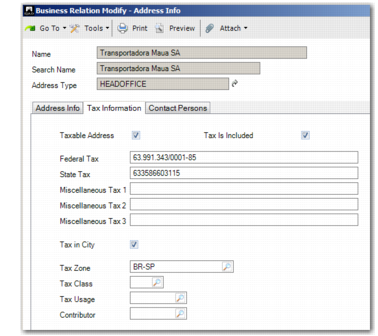
Business Relation Modify, Tax Information Tab
Federal Tax
Specify the federal tax ID.
For companies, the federal tax ID is the Cadastro Nacional Pessoa Jurídicas (CNPJ), which is the identification number issued to all Brazilian companies by the Ministry of Finance. The CNPJ format is 99.999.999/9999-99, and the tax ID you record in the Federal Tax field is validated using a check digit.
For individuals, the federal tax ID is the Cadastro Pessoa Físicas (CPF), which is the identification number issued to all Brazilians and Brazil residents who pay taxes or partake in activities that generate revenues. The CPF format is 999.999.999.99.
The ID is validated using a check digit and based on the tax format prescribed by the government.
State Tax
Specify the tax ID assigned by the Brazilian state in which the company operates. The ID is validated based on the tax format prescribed by the state.
Contributor
Specify whether this business relation is ICMS, ICMS-exempt or a non-contributor. The available options are set in Language Detail Maintenance (36.4.2).
If the federal or state tax ID does not match the prescribed format, an error message is displayed and you cannot save the record unless you specify a tax ID in the correct format.