QAD Solution
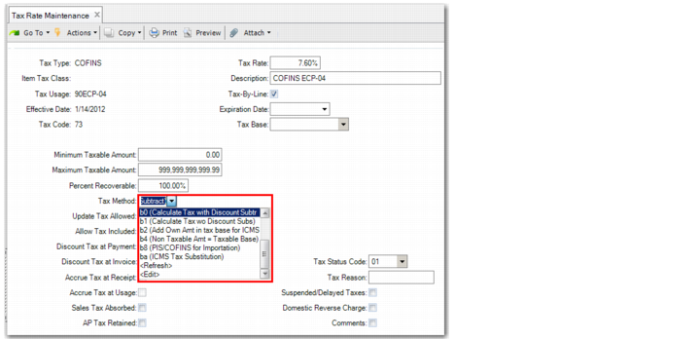
QAD has developed several new tax methods to support Brazilian taxation. The tax methods are available in the Tax Method field of Tax Rate Maintenance (29.4.1).
Tax Rate Maintenance, Tax Method Field
• b0
Calculates taxes using unconditional discounts to reduce the tax base. Normally used when the tax is included in the price. Used with Imposto sobre Circulação de Mercadorias e Serviços (ICMS) tax. Calculates tax according to the formula:
Tax = (Taxable Base – Discount) * (Tax Rate/100)
• b1
Calculates taxes without using unconditional discounts to reduce the tax base. Used with Imposto sobre Produtos Industrializados (IPI) tax, where the system must not consider unconditional discounts. Calculates tax according to the formula:
Tax = Taxable Base * (Tax Rate/100)
• b2
Calculates taxes by adding a user-specified amount to the tax base. Used in the ICMS importation process. Calculates tax according to the formula:
Tax = (Tax Base + Tax) * (Tax Rate/100)
Nontaxable Amount = Taxable Base Amount
Taxable Base Amount = 0
• b3
Calculates taxes with discounts and reduces the tax base using the nontaxable base amount. Calculates tax according to the formula:
Tax = (Taxable Base – Discount) * (Tax Rate/100)
Nontaxable Amount = Taxable Base Amount
Taxable Base Amount = 0
• b4
Calculates taxes without a reduced tax base. Used with IPI calculation tax, which does not consider unconditional discounts. Calculates tax according to the formula:
Tax = Taxable Base * (Tax Rate/100)
Nontaxable Amount = Taxable Base Amount
Taxable Base Amount = 0
• b5
Calculates tax using a ranges of values to calculate the amount to deduct, which is specified in the Tax Base field. Used with Imposto de Renda sobre Pessoa Física (IRPF) tax. Calculates tax according to the formula:
Tax = (Taxable Base * Tax Rate) – Deductions by Range)
• b6
Calculates tax amounts based on the limits used in ranges. Used with Instituto Nacional do Seguro Social (INSS) tax. Calculates tax according to the formula:
Tax = Taxable Base * Tax Rate limited to the maximum value
• b7
Calculates tax amounts using the Basic Productive Process calculation method using the formula:
PPB = 1 - (Tax Rate/100)
• b8
Calculate taxes using precalculated IPI, ICMS, and Imposto sobre Importação (II) included in the tax calculation formula. Used with Programa de Integração Social (PIS) tax and Contribuição para o Financiamento da Seguridade Social (COFINS) tax for importation.
• b9
Calculates ICMS importation tax using the nontaxable base amount. Calculates tax according to the formula:
Tax = (Taxable Base + Tax) * (Tax Rate/100)
Nontaxable Amount = Taxable Base Amount
Taxable Base Amount = 0
• ba
ICMS substitution tax method. Calculates tax according to the formula:
Tax = Taxable Base * (Tax Rate/100) - ICMS Amount
• bb
IPI importation tax using the nontaxable base amount.
• bc
PIS or COFINS tax with ICMS reduced tax base for importation. This method uses the same calculation formula as method b8, except that the ICMS tax amount is calculated using a non-reduced base.
• bd
ICMS tax with reduced tax base amount for importation. Calculates tax according to the formula:
Tax = (Taxable Base + Tax) * (Tax Rate/100)
• be
IPI tax included in the ICMS base amount for final consumer sales. Calculates tax according to the formula:
Tax = (Taxable Base + Tax) * (Tax Rate/100)
• bf
ICMS substitution tax using average tax charges. Calculates tax according to the formula:
ICMS Substitution Tax = Taxable Base * (Tax Rate/100)
ICMS Tax = Taxable Base * (Tax Rate/100)
ICMS Substitution Taxable Base = (ICMS Tax + ICMS Substitution Tax) * (100/Tax Base Percent)
• bg
ICMS tax calculated for interstate operations using the origin code of the goods. The tax rate is 4%, and the tax is regulated by resolution 12/2013 from the Brazilian Senate.
• bh
The method (BH) is used for the ICMS CST 51 - Diferimento.
The Tax Amount is calculated considering the Markup percentage. For example:
Tax Base = 1000.00
ICMS Tax Rate = 12%
Tax Amount Without Applying Markup = 120.00
Markup Rate = 10%
Tax Amount: 120 - 10% = 108.00