QAD Solution
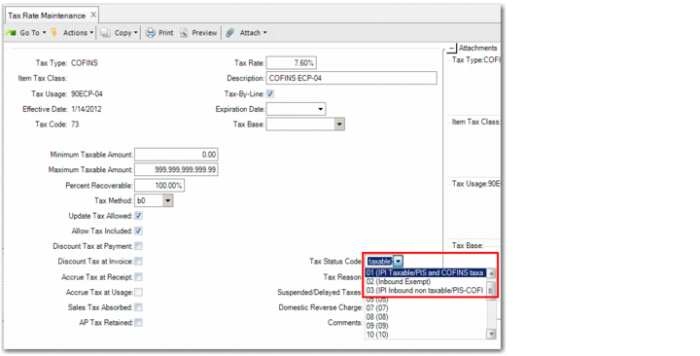
In Tax Rate Maintenance, you can use the Tax Status Code field to define a tributary situation code to associate with tax rates for Brazilian transactions.
The tributary situation code identifies the tax policy for the goods. The values for the Tax Status Code field are defined in Generalized Codes Maintenance (36.2.13) using the field name tx2_cst_code.
Tax Rate Maintenance, Tax Status Code Field
Tax Status Code
Select the legal document tributary situation code used to identify the tax policy for the goods. You define the list of tax status codes in Generalized Codes Maintenance.
See User Guide: QAD Global Tax Management for more information on tax rates and Tax Rate Maintenance. See User Guide: QAD System Administration for more information on generalized codes.
Applying Tributary Situation Codes to Transactions
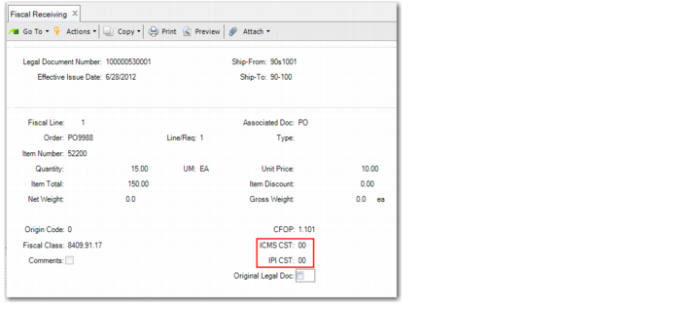
When you process legal documents in Fiscal Receiving (5.20.1), you must specify a PIS, COFINS, IPI, or ICMS tax status code, depending on the taxes that apply. The values default from Tax Rate Maintenance, but you can update the default value.
Fiscal Receiving, Fiscal Line Frame
ICMS CST
Enter a tax status code for ICMS to identify the operation. The code contains information on the origin of the goods and tax policy for the goods. It consists of three digits. The first digit denotes the origin of the goods and the last two digits denote the ICMS taxation.
IPI CST
Enter a tax status code for IPI to identify the origin of the goods and the tax policy for the goods.
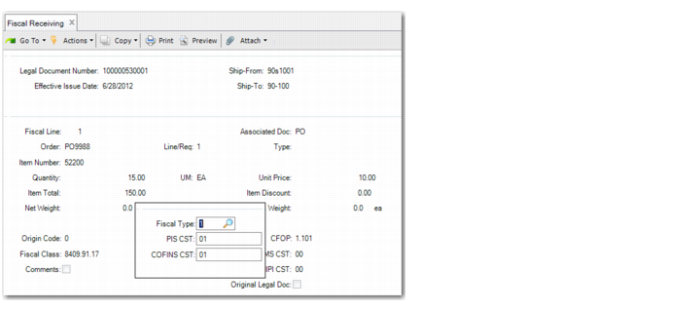
Fiscal Receiving, Item Fiscal Type, PIS, and COFINS Details Frame
PIS CST
Specify the tax status code for PIS tax to identify the origin and the tax policy for the goods.
The PIS CST value defaults from the Tax Status Code field in Tax Rate Maintenance.
COFINS CST
Specify the tax status code for COFINS tax to identify the origin and the tax policy for the goods.
The COFINS CST value defaults from the Tax Status Code field in Tax Rate Maintenance.
See User Guide: QAD Purchasing for more information on Fiscal Receiving.