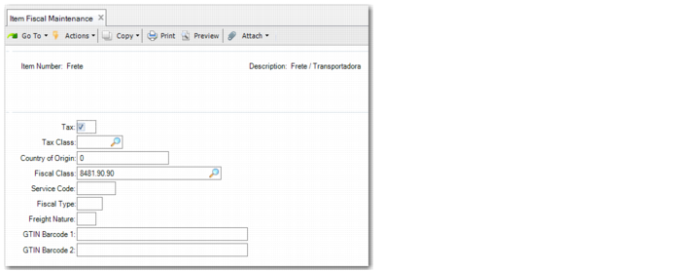
Configuring Fiscal Data for Items
Use Item Fiscal Maintenance (1.3.1) to specify fiscal details for an item such as the fiscal class and bar code. The details you record in Item Fiscal Maintenance are used by electronic notas fiscais and by the fiscal accounting extract.
Item Fiscal Maintenance
Item Number
Specify the item number for which you want to record fiscal details.
Tax
Select the field if the item is taxable.
Tax Class
Specify the tax class that applies for the item. This field is optional.
Country of Origin
Specify a code that indicates the item’s origin.
0: The item is produced domestically.
1: The item is imported.
2: The item is imported indirectly.
Fiscal Class
Specify the item’s fiscal classification, which is a mandatory tax code defined by the Brazilian government to help identify materials and determine their corresponding tax rates. This information is used in the fiscal accounting extract.
Fiscal classes are defined in Item Fiscal Class Maintenance (1.7.1).
Fiscal Type
Specify a code that indicates the type of operation:
• 00: Goods for resale.
• 01: Raw materials that, physically and chemically, compose a product in process or a finished product. Goods received for processing are classified as type 01.
• 03: Goods in process. The product originates from a production process and is primarily consumed in a new production process.
• 04: Finished product. The product originates from a production process, is the end result of this process, and is ready to be sold.
• 05: By-product. The product originates from a production process, and is not the main output from the process. The by-product has economic use and does not fit the concept of a product in process (type 03) or a finished product (type 04).
• 06: Intermediate. An item that is not incorporated into a new product, but is consumed in the process to create the new product.
• 07: Consuming product. A product received from a supplier for use in a non-productive process or a product that is not consumed in a production process.
• 08: Fixed asset
• 09: Services
• 10: Other supplies
• 99: Other
Service Code
Specify the item fiscal code used to identify services such as third-party services or communication services. This information is used in the fiscal accounting extract.
Freight Nature
Specify the item’s freight classification. This information is used in the fiscal accounting extract.
GTIN Barcode 1
Specify the item’s product barcode number, which is used in the electronic nota fiscal.
GTIN Barcode 2
Specify the barcode number for the item shipment if multiple items are normally shipped and packaged together.
When you click Next, NVE Code fields are displayed.
NVE Description
Enter the NVE description. NVE is a unique Brazilian classification and is based on Mercosul Common Nomenclature (NCM). It is added a attributes and specifications. NVE is characterized by the addition of four numbers and two letters to the product identification code.