Configuring Legal Document Settings
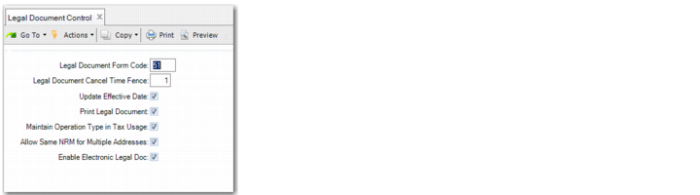
Use Legal Document Control (7.10.24) to configure settings that affect the generation and printing of notas fiscais as well as other legal documents-related features.
Legal Document Control
Legal Document Form Code
Specify the default legal document form code used in Document Format Maintenance (2.18.13).
Enter a two-digit numeric form code that uniquely identifies a country-specific legal document type. When you enter a valid form code, the legal document type description is displayed next to the form code.
Some countries have legal requirements to print legal documents with specific numbering rules, information, formats, and layouts when issuing, receiving, and/or moving goods. The form code identifies the appropriate printing procedure.
A valid form code is supported by a legal document generation program file installed in your system. If the file is not found, an error message displays.
Note: Specify code 51 for Brazil.
Legal Document Cancel Time Fence
Specify the number of days after the creation date within which legal documents can be cancelled during shipper unconfirm. Legal documents cannot be cancelled outside this time fence.
If 0, legal documents cannot be cancelled regardless of how recently they were created.
Update Effective Date
Specify whether the effective date can be updated in Pre-Shipper/Shipper Confirm. Enter Yes to allow update; otherwise, enter No.
Print Legal Document
Specify whether you want to print legal documents along with shippers by default.
This value defaults to the Print Legal Document option in the functions that create confirmed shippers.
A legal document is typically generated when a shipper is created and assigned a document number when the shipper is confirmed. When a shipper is confirmed, the system provides you with the option to immediately print the legal document along with the shipper.
Note: For notas fiscais, you must select this field.
Maintain Operation Type in Tax Usage
This field is specific to Brazilian legal documents.
Enter Yes to enable the following legal documents features specific for Brazil:
• Display the Legal Information frame in Tax Usage Maintenance (29.1.9).
• Enforce that the tax usages specified in Simultaneous Operation Maintenance (7.10.13) must have the operation type of 11 Sales or 12 Other.
• Dictate the mandatory use of tax usage with operation type set to 11 Sales or 12 Other when you process retrobilling in Retrobill Report (7.13.3).
Note: For notas fiscais, you must select this field.
Allow Same NRM for Multiple Addresses
Specify whether it is allowed to assign the same NRM sequence to multiple addresses with different federal tax IDs.
Yes: You can assign the same NRM sequence to multiple addresses in Legal Document NRM (36.2.21.9).
Note: For Brazilian notas fiscais, you must select this field.
No: The same NRM sequence can be assigned to multiple addresses only when these addresses are associated with the same federal tax ID. When you assign an NRM sequence to an address in Legal Document NRM (36.2.21.9), the system checks whether the sequence has already been assigned to another address with a different federal tax ID. If so, the system displays an error message and prevents you from proceeding.
The default is Yes.
Enable Electronic Legal Doc
Select this field to enable the use of electronic notas fiscais.
Note: For electronic notas fiscais, you must select this field.