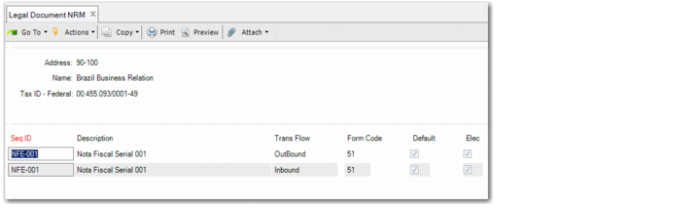
Configuring Legal Document NRM
You must associate the electronic nota fiscal sequence IDs with ship-from address codes in Legal Document NRM (36.2.21.9).
Use Legal Document NRM to maintain site-NRM sequence relationships for legal documents such as electronic notas fiscais. Legal documents can use multiple NRM sequences at one site or location represented by a physical address. You specify a default NRM sequence to use when generating legal document sequence numbers and can change the sequence as needed.
The Allow Same NRM for Multiple Addresses setting in Legal Document Control (7.10.24) determines whether you can assign the same NRM sequence to multiple addresses with different federal tax IDs.
Only sites or locations with physical addresses can be assigned legal document NRM sequences.
Important: You must set up the same sequence for both types of electronic nota fiscal transactions: inbound and outbound.
Legal Document NRM
Address
Enter the company address that represents the actual physical address of the ship-from site or location. This address is required for legal documents accompanying movements of goods between sites or locations that are physically separated.
Sequence ID
Enter an NRM sequence ID used for generating legal documents at the current address. When you enter a valid sequence ID, its description displays in the Description field.
You can associate multiple NRM sequences with an address.
NRM sequence IDs for legal documents are defined in Number Range Maintenance and use the abs_id.LegalDoc dataset.
Transaction Flow
Specify the direction of the inventory movement from a business perspective to determine if the transaction requires any legal documents, and if so, what type of legal documents.
• Inbound: Inventory moves into the site/plant and may require receiving legal documents.
• Outbound: Inventory moves out of the site/plant and may require issuing legal documents.
Form Code
Enter a two-digit numeric legal document form code that uniquely identifies a country-specific legal document format. The default code is specified in Legal Document Control (7.10.24). The code for Brazil is 51.
Default
Enter Yes to set this NRM sequence as the default legal document numbering sequence for the current address; otherwise, enter No.
Elec
You must select this field for electronic notas fiscais.