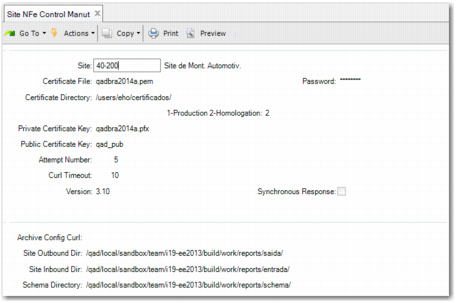
Setting Up Site Parameters
Use Site NFe Control Manut (7.10.7.15) to set up parameters for each site that issues electronic notas fiscais.
The parameters you must define include the electronic nota fiscal certificate file name and location, the password for accessing the SEFAZ Web service, the public and private keys for signing the electronic nota fiscal, and the directories in which the electronic nota fiscal files are stored.
When you are issuing electronic notas fiscais, use Site NFe Control Manut to indicate whether you want to automatically request authorization from SEFAZ and print the DANFE as part of the shipper process or whether you want to use separate authorization and DANFE print steps.
Site NFe Control Manut
Site
Specify the site for which you want to define electronic nota fiscal settings.
Certificate File
Specify the file name for the digital certificate that authorizes your company to create electronic nota fiscal files.
By referencing the CNPJ code that identifies your company for fiscal purposes, you can purchase an electronic nota fiscal digital certificate from authorized private companies. The certificate includes an e-CNPJ, which guarantees the authenticity and integrity of electronic transactions (such as electronic notas fiscais) issued by your company.
Password
Specify the certificate password, which is required to sign electronic nota fiscal files and to connect to the SEFAZ Web service. The password must contain at least 20 characters and must not contain spaces.
Certificate Directory
Specify the directory in which the electronic nota fiscal digital certificate is stored.
Environment Type
Specify the environment type.
1: production environment
2: homologation (test) environment.
Private Certificate Key
Specify the private key used to sign the electronic nota fiscal file. The private key is the name registered with the HSM and has the extension .PFX if the system software uses a Java signature.
Public Certificate Key
Specify the public key used to sign the electronic nota fiscal. The public key name is the name registered with the HSM device. The public key does not use a Java signature.
Attempt Number
Specify the number of attempts that the system must make to request authorization from SEFAZ.
If you specify 0, the system will try indefinitely until it receives a status of authorization or rejection from SEFAZ.
Important: Specify -1 if you want to implement SEFAZ authorization and DANFE print steps that are not integrated into the shipper process.
Curl Timeout
Specify the amount of time in seconds until the system tries to access the Internet address of the SEFAZ Web service. If you leave the field blank, the default of 30 seconds is used.
cURL is a command line tool used to send files using URL syntax and is used to communicate with the SEFAZ Web service.
Version
Specify the nota fiscal version. The possible values are 2.0 or 3.1.
Synchronous Response
Specify whether a synchronous response applies. The synchronous response is only available for version 3.1.
Archive Config Curl
Specify the location of the cURL configuration file. This file can contain information such as the proxy server, the proxy password, and other parameters, depending on your installation.
Normally, a proxy server or firewall requires additional configuration parameters.
Site Outbound Dir
Specify the path to the directory in which outbound electronic nota fiscal files are stored.
Site Inbound Dir
Specify the path to the directory in which inbound electronic nota fiscal files are stored.
Schema Directory
Specify the path to the XML schema used to validate the electronic nota fiscal files.