Checking the Validity of the Access Key
Note: This functionality is available if you are running version QAD 2013 Enterprise Edition or higher.
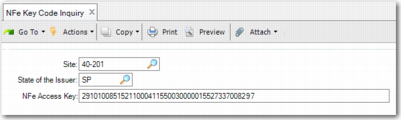
NFe Key Code Inquiry (5.20.3.3) lets you validate the NFe key code using the government SEFAZ web site prior to fiscal receiving. You can type the 44 character code in the field or you can use a barcode scanner to read the access key code from the DANFE form.
The NFe Key Code Inquiry generates an XML file that is sent to SEFAZ for validation. SEFAZ returns an XML file with the response, indicating whether the key code is valid.
NFe Key Code Inquiry
Site
Select the site that is to receive the purchases.
State of the Issuer
Select the state from which the supplier issues the NFe key code.
NFe Access Key
Enter the 44-character NFe access key received from the supplier.