QAD Internationalization Extensions, Brazil 4.0
>
User Guide
>
Electronic Notas Fiscais
>
Canceling Electronic Notas Fiscais
Canceling Electronic Notas Fiscais
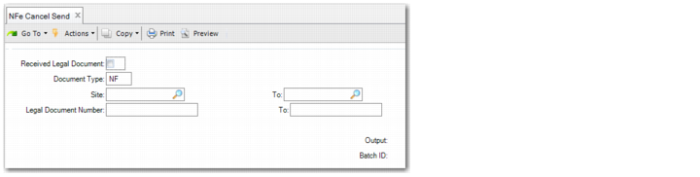
Use NFe Cancel Send (7.10.7.7) to create an XML file containing details on canceled electronic notas fiscais. You can request to cancel electronic notas fiscais you have issued or received.
You must then send the file to the designated SEFAZ Web service that handles requests for canceled electronic notas fiscais. The message request to cancel an electronic nota fiscal must be digitally signed by the issuer. The XML file created has the suffix -ped-can.xml.
When the designated SEFAZ Web service receives the cancellation requests, the Web service processes the requests and returns the result. The XML file is discarded by SEFAZ if it exceeds the maximum size limit (500 KB).
The process is as follows:
1 Use NFe Cancel to create a file with details on canceled electronic notas fiscais in the format prescribed by SEFAZ.
2 Sign the XML file.
3 Create a batch of XML files and encapsulate the XML files.
4 Transmit the files to the designated SEFAZ Web service.
5 Wait for a response from the Web service.
NFe Cancel Send
Received Legal Document
Select this field to cancel electronic notas fiscais received.
Document Type
Enter a code that indicates the type of file to generate. The required value for this field is NF (Nota Fiscal).
Site
Specify the sites for which you want to cancel electronic nota fiscal file transmissions.
Legal Document Numbers
Specify the electronic nota fiscal numbers for which you want to generate a file that indicates unused numbers.