Creating a Correction Letter
Use Correction Letter Create (7.10.7.18.1) to send correction letters to SEFAZ for authorization.
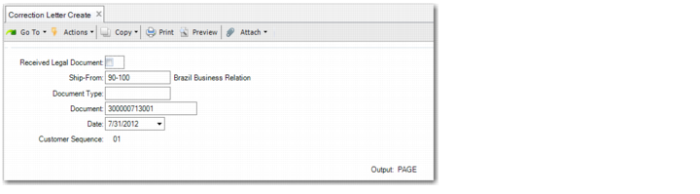
Correction Letter Create
Received Legal Document
Select the field if you want to send a correction letter for a nota fiscal received by your company. Leave the field blank to send a correction letter for a nota fiscal issued by your company.
Ship-From
Specify the ship-from address for which you want to send a nota fiscal correction letter to SEFAZ.
Document Type
Specify the type of document you want to correct. The default is to leave the field blank.
Document
Specify the document number for the nota fiscal you want to correct. The nota fiscal must already have been authorized by SEFAZ.
Date
Specify the date on which the nota fiscal was issued.
Customer Sequence
The system assigns a value for this field to indicate the corrections applied to a specific nota fiscal. The first correction is assigned the value 01 and the field is incremented for each subsequent correction letter sent to SEFAZ.
The most recent authorized correction letter is the most valid and must indicate all cumulative fixes for the electronic nota fiscal.
Click Next.
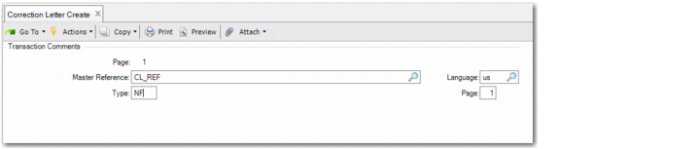
Correction Letter Create, Transaction Comments Frame
Specify the master reference, type, language, and page exactly as you defined them in Master Comment Maintenance.
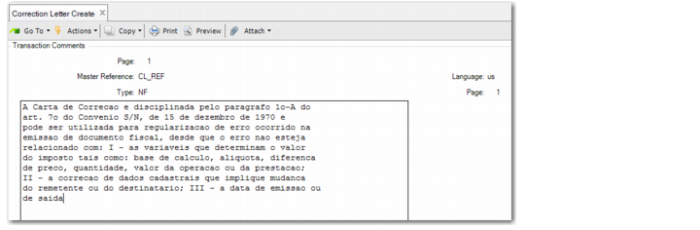
Click Next to review the comment text. Edit the text as appropriate to indicate the type of error you want to correct.
Correction Letter Create, Comments
When you are finished reviewing and editing the correction letter text, click Back to return to the first frame.
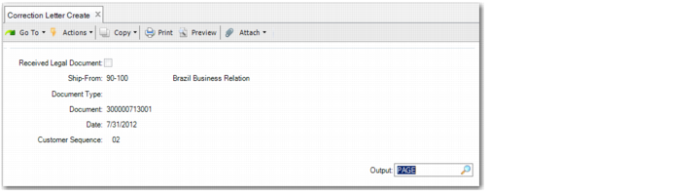
Correction Letter Create, First Frame
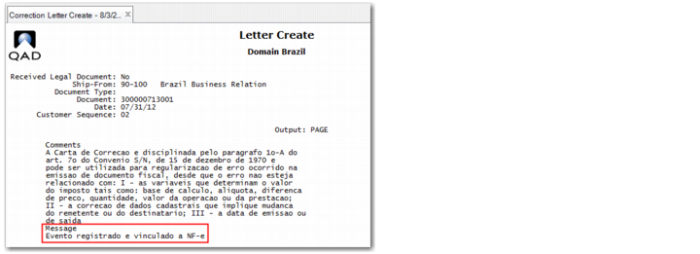
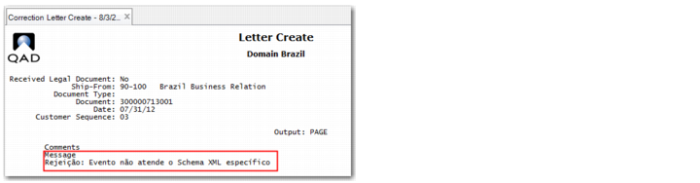
Specify an output type and click Next again to display a report, which indicates whether the correction letter was accepted or rejected by SEFAZ.
Correction Letter Accepted by SEFAZ
Correction Letter Rejected by SEFAZ