Defining Fiscal Control Accounts
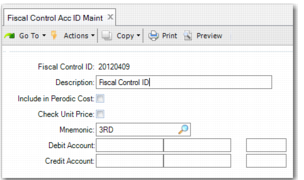
Use Fiscal Control Acc ID Maint to create the fiscal control account codes that the system uses to control the notas fiscais used in inventory operations. You must also link the fiscal control account to the tax usages that represent the operations you want to control.
Fiscal Control Acc ID Maint
Fiscal Control ID
Enter a maximum of eight alphanumeric characters to identify the operation to control.
Description
Enter a maximum of 24 alphanumeric characters for a description of the fiscal control ID.
Include in Periodic Cost
Select this field if the fiscal control account can be used in periodic costing reports.
Check Unit Price
Select this field if you want the system to control the unit price of items in addition to item quantities using fiscal control. If you select this field, the system only considers entry and exit notas fiscais with both the same quantity and the same price when matching addition and subtraction operations.
Clear the field to only include item quantities in fiscal control. If the field is cleared, the system only considers entry and exit notas fiscais with the same quantity when matching addition and subtraction operations.
Mnemonic
Specify the type of third-party inventory operation that you want to track using the fiscal control ID:
3RD: Control goods on a third-party site.
ONSITE: Control third-party goods on your premises.
Debit Account
Specify the debit account to link to the fiscal control account. This must be a valid GL account. The debit account is then used to report on the inventory records for materials.
This field is optional. The debit account you specify is used in reports only and not in accounting transactions.
Credit Account
Specify the credit account to link to the fiscal control account. This must be a valid GL account. The credit account is then used to report on the inventory records for materials.
This field is optional. The credit account you specify is used in reports only and not in accounting transactions.
Fiscal Control Acc ID Maint, Tax Usage Frame
Tax Usage
Enter the tax usages needed to control the fiscal operation. You cannot specify a usage code that is already linked to another fiscal account.
Press the Insert button to enter a tax usage.
Add/Subtract
Specify how the operation type associated with the tax usage affects the inventory type you specified in the Transaction Type field.
Add: Select Add for operation types that increase the quantities of the inventory type specified in the Transaction Type field. For example, if you specified 3RD (Third Party Goods on Site) in the Transaction Type field and you specified a tax usage for Issues - Unplanned, this type of operation increases the quantities of your company’s goods at a third-party site.
Subtract: Select Sub for operation types that decrease the quantities of the inventory type specified in the Transaction Type field. For example, if you specified 3RD (Third Party Goods on Site) in the Transaction Type field and you specified a tax usage for Receipts - Unplanned, this type of operation decreases the quantities of your company’s goods at a third-party site.
FIFO
You can only select this field for subtraction operations.
When you select the FIFO field for subtraction operations, the system automatically identifies the corresponding addition transaction.
If you do not select the FIFO field, the system prompts you to manually identify the addition fiscal control transaction in functions such as Fiscal Receiving.
Act
Select this field to indicate that fiscal control is active for the tax usage.