DDA Import Control
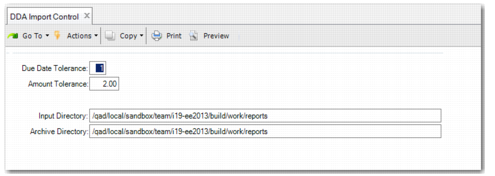
DDA Import Control (28.1.1.14.24) enables you to specify the settings for matching Boleto Bancario with supplier invoices. Matching occurs with a tolerance for due date and balance amount. You can set default values for the amount and date tolerance. You can also specify default input and archive directories for the files received from the bank.
Due Date Tolerance
Enter the number of days difference allowed between the Boleto Bancario date and the supplier invoice date that still allows matching to take place.
Amount Tolerance
Enter the difference in amount allowed between the Boleto Bancario and the supplier invoice that still allows matching to take place.
Input Directory
Enter the directory from which the bank files are read.
Archive Directory
Enter the directory where uploaded bank files are to be stored.
DDA Import Control