QAD Internationalization Extensions, Brazil 4.0
>
User Guide
>
Brazilian Reports
>
GL Transaction Report – LD
GL Transaction Report – LD
Business Requirement
In Brazil, companies who want to submit a Diário report to the fiscal authorities must be able to generate a report with GL transactions by posting date. The Diário report is optional in Brazil.
QAD Solution
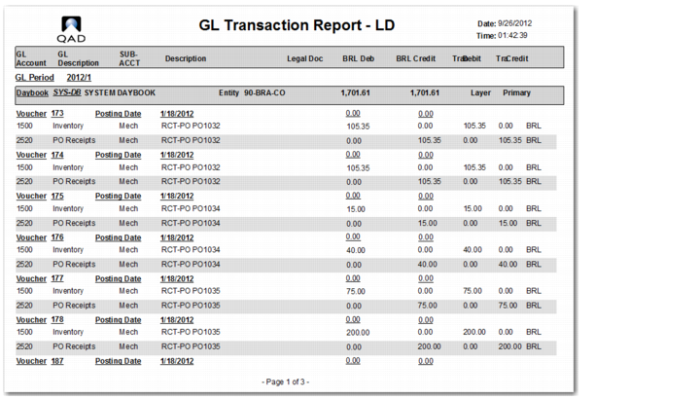
QAD has developed the GL Transaction Report – LD to meet Diário reporting guidelines.
Running the Report
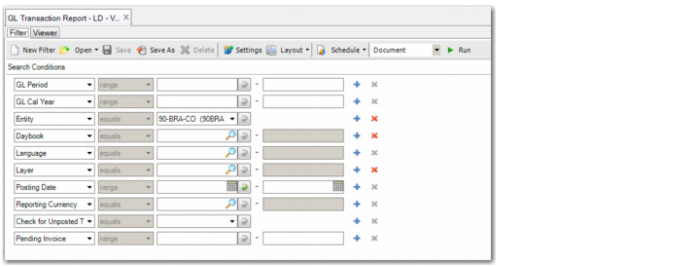
Use GL Transaction Report – LD (25.15.7.13) to run the report.
GL Transaction Report – LD, Selection Criteria
GL Period
Specify the GL period or range of GL periods for which you want to run the report.
GL Cal Year
Specify the GL calendar year or range of GL calendar years for which you want to run the report.
Entity
Specify the entity for which you want to run the report. The default is the current entity.
Daybook
Specify the daybook or range of daybooks for which you want to run the report.
Language
Specify the reporting language for which you want to run the report.
Layer
Specify the accounting layer for which to run the report.
Posting Date
Specify the posting date for which you want to run the report.
Reporting Currency
Select any report output currency. By default, the system uses the domain currency if all domains within the selection have the same currency. Otherwise, the statutory currency is used. With any other currency, the system calculates the amounts with the exchange rate valid on the report date.
Check for Unposted Transactions
Select Yes if you want the report to check for and include operational transactions that are not yet posted to the transactions history table.
Pending Invoice
Specify pending invoices to include in the report output.
GL Transactions Report – LD