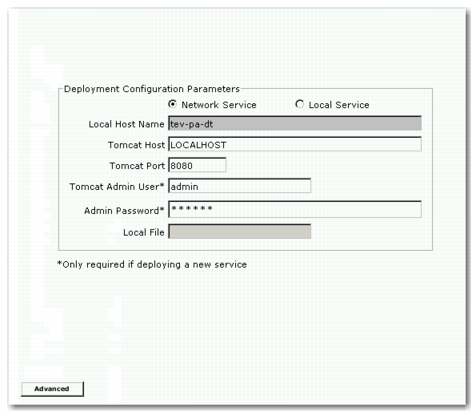
Specify Deployment Configuration Parameters
Specify Deployment Configuration Parameters
Network Service
Select this option to use a QDCS on your network.
Note: Tomcat must be installed and running to use Network Service. If you have an existing deployment service, create a service because the version changed in the QXtend 1.6.2 release.
Local Service
Select this option to use a QDCS file on your local machine. Using this option disables all fields except Local File.
Local Host Name
This field displays the name of the current machine (read-only).
Tomcat Host
Enter the Tomcat server name (for Network Service only).
Tomcat Port
Enter the Tomcat port number (for Network Service only).
Tomcat Admin User
Enter the user name for the Tomcat manager role (for Network Service only).
Admin Password
Enter the password of the user with the manager role (for Network Service only).
Local File
Enter the file name on the local machine containing the parameter settings (for Local Service only).
Advanced
Click this button to display a dialog box that allows you to specify the name of a new QDCS.
13 A pop-up window may display that says a QAD Deployment Configuration Service (QDCS) was not detected on a host. This means that the QDCS is not deployed on the Tomcat server specified or the wrong server was specified. Click Yes if you want the installer to deploy the QDCS.
14 Click Next. The Environment Selection screen displays.