QAD QAD QXtend 1.8.7
>
Install Guide
>
Process Control
>
Using Process Control
Using Process Control
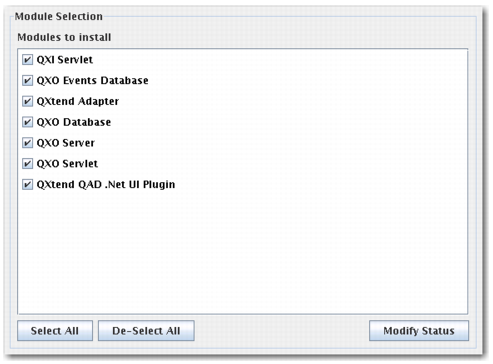
Click the Modify Status button on the Module Selection Screen.
Module Selection Screen
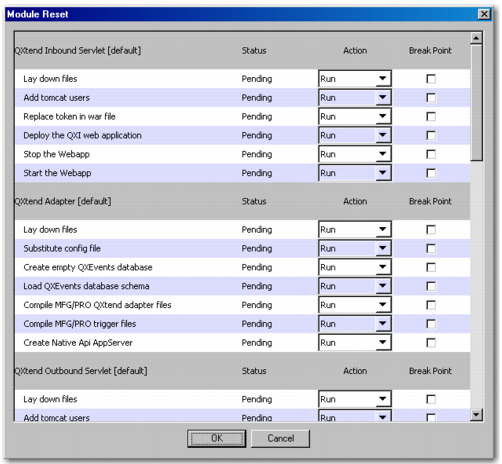
The Modify Status pop-up appears.
Modify Status Pop-up
Changing the action via the selection lists enables you to run, rerun, or skip each of the routines. This feature allows you to skip tasks that were run in previous installs (such as adding the Tomcat users) or to rerun a specific routine (such as compiling the adapter).
Note: All routines are included for a reason. Skipping a routine could result in an incomplete or non-functional installation. Only skip routines that you are sure are not needed.
Selecting a routine’s breakpoint check box pauses the installer before it runs the routine. This feature allows you to pay particular attention to that part of the install.
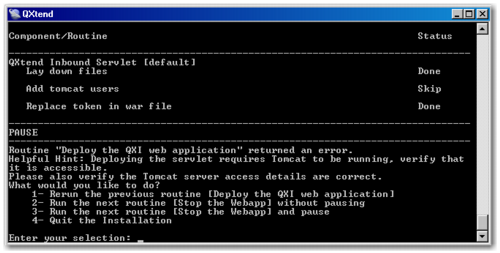
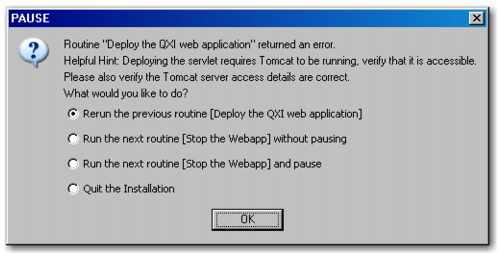
If the installer encounters an error while running, it pauses, allowing you to fix environment problems on the fly. For example, if Tomcat is not running when the installer tries to deploy the servlets, the installer pauses. You can investigate using the log file, see that Tomcat was not started, and start it. The installation continues as if nothing had happened.
Console Prompt After an Error
GUI Prompt After an Error
You cannot correct configuration errors in the repository file. For instance, if you forgot to add a custom element to the compile PROPATH, you cannot add it once the installation starts and rerun the routine after it fails. Rerun the installer and let it pick up the new value.
In summary, do the following when errors occur:
• To correct the parameters, quit the installer, fix the configuration, and rerun the installer.
• For environment issues such as permissions problems, the database failing to start, you can fix the issue and resume the installer by selecting “Rerun the previous routine.”
• In rare situations, the installer hangs and does nothing. You can kill the process (typically by pressing Ctrl+c for the console installer), identify the problem, fix the issue, and rerun the installer.