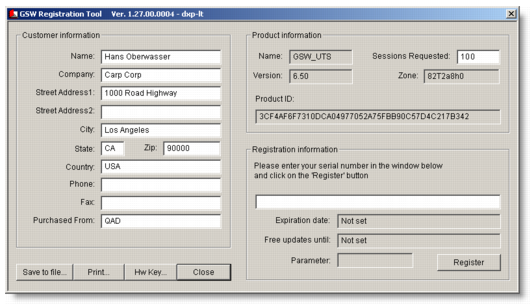
Register the Georgia SoftWorks Software
To register GSWTS, provide a product ID to Georgia SoftWorks so that a serial number can be generated for your product. The serial number identifies the server hardware and software components. If these components change or are upgraded, contact Georgia SoftWorks about generating a new product ID and serial number.
Important: If you must reinstall or are planning to move your installation to a different platform, or if you are a sales agent or a distributor, include that information on the registration.
1 Select the Registration icon from the GSWTS program group in the Start menu.
2 Enter your customer information in the Georgia SoftWorks Product Registration window. The information displayed in the Product Information section is system generated.
3 Set Sessions Requested to 100. This value is the number QAD automatically supplies with your registration.
Georgia SoftWorksRegistration
4 Choose Save to File to save this information or choose Print.
Then send the product ID to Georgia SoftWorks by e-mailing the saved registration form file to
[email protected] or faxing the printed registration form to 706-265-1020. After Georgia SoftWorks receives your form, a serial number is generated for your product and sent to you.
5 When you receive your serial number, return to the Georgia SoftWorks Product Registration window, and enter the number in the appropriate field in the registration form. Click Register.