QAD QXtend Inbound
QXtend Inbound (QXI) enables external (non-QAD) applications to process transactions in QAD Enterprise Applications via SOAP Web Service messages. The contents of the SOAP messages have to follow the standards that are defined in the QDoc specification that is a QAD-controlled way of representing data that is processed by QXtend.
QDocs follow standards defined by the Web Services Interoperability Organization (WS-I) Following these standards allows QXtend to be used by any product that supports the WS-I standards. For more information on WS-I, see http://ws-i.org.
QXI is not only used to integrate external applications, but also to process transactions between QAD modules such as CSS and QPS.
QXI provides a standard mechanism that can be used to load data into many of the QAD Enterprise Applications including the core ERP modules from the eB version onwards and from modules like QAD EAM, QAD CRM, and QAD PIM. Over time more of the standard integration for QAD modules will rely on the QAD QXtend toolset.
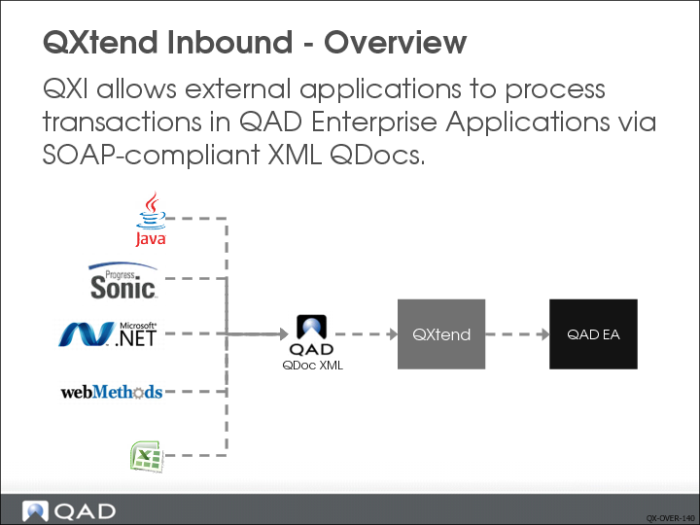
Loading data into the QAD Enterprise Application is enabled through a Web service that follows the guidelines established by WS-I. Ensuring that QXtend follows industry standards for Web services ensures that any application capable of invoking a Web service call load data into QAD Enterprise Applications. The slide above shows some application types that can use the QXI Web service. As you can see, anything from Microsoft to Java can leverage QXI.
Using a Web service ensures that most external applications can leverage the many APIs available through QXI. Web services also isolate the external application from the API implementation details; for example, the external application does not have to understand anything about Progress-based applications in order to communicate with one.
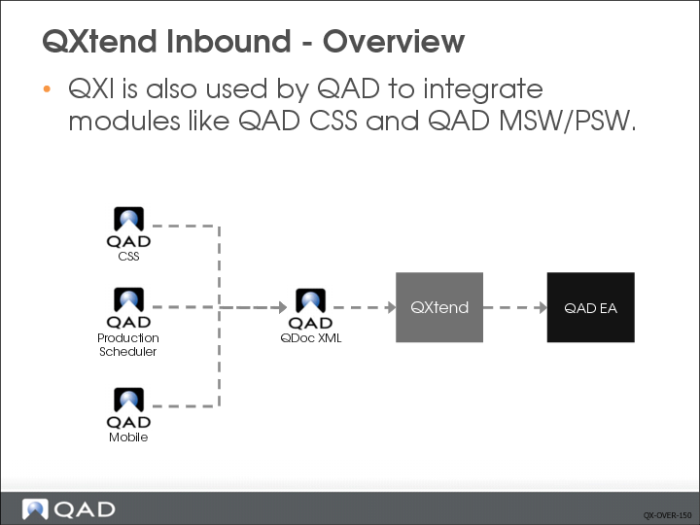
QXI has also been used by QAD to facilitate the integration of new modules developed by QAD. QAD modules like QAD CSS, QAD MSW/PSW, and QAD Mobile use QXtend’s services to provide flexible module integration. Being able to use a common framework to provide integration solutions internally at QAD—as well as for external products—is one of the great value propositions of QXtend. A common integration framework simplifies the deployment and support of QAD module-to-module integration.
QXI controls the processing of QDocs for all QAD Enterprise Applications that provide APIs that are available to QXtend. Currently not all QAD modules support QXtend, but the modules that do will continue to grow. Eventually, QXtend will become the standard integration toolset at QAD.
QXtend Adapters
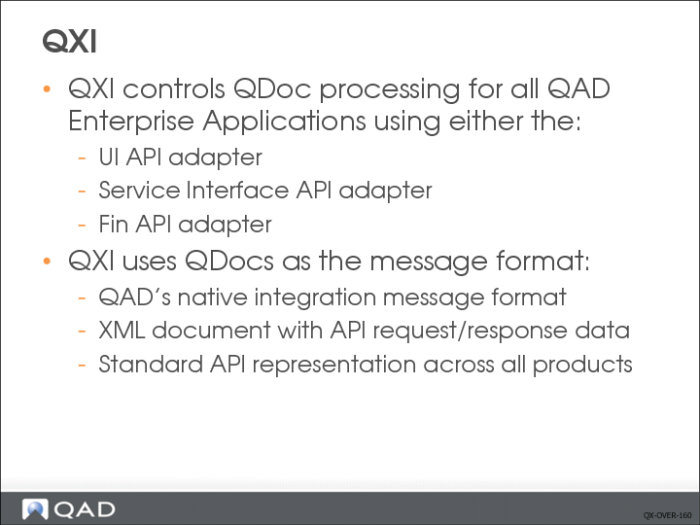
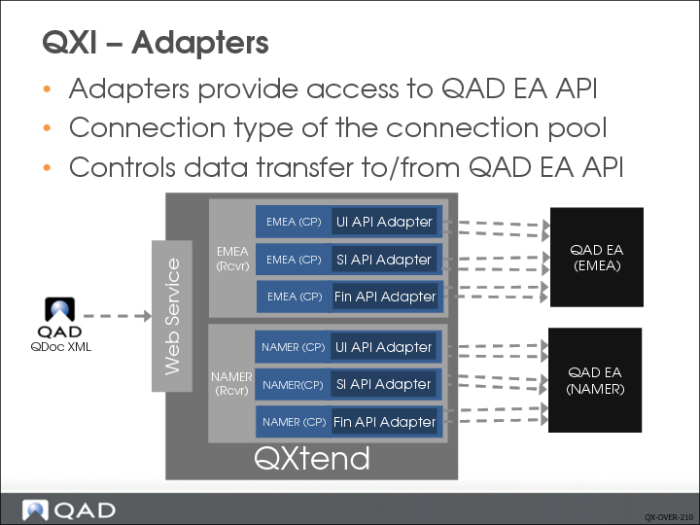
QDocs are processed using a QXtend adapter. QXtend currently supports three types of adapter: UI API adapter the service interface (SI) API adapter and Fin API adapter.
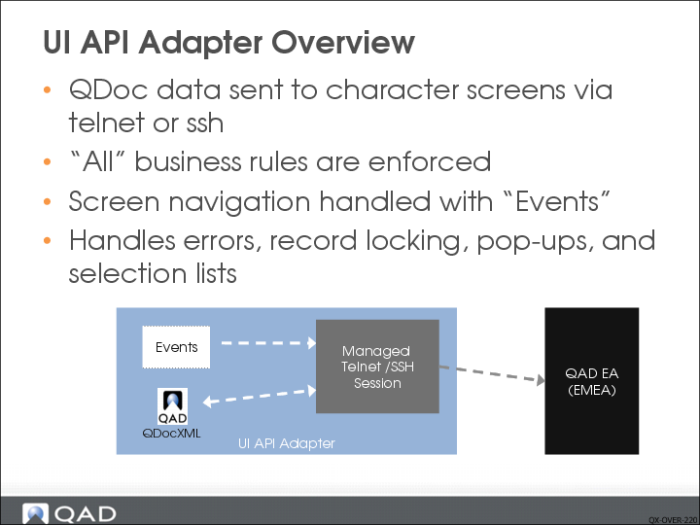
The UI API adapter provides access to most character screens developed for previous versions of QAD EA. The UI API adapter uses a telnet or ssh session to enter data from the QDoc being processed by QXI. The adapter loads the data using the character screen, and executes all business logic associated with that screen.
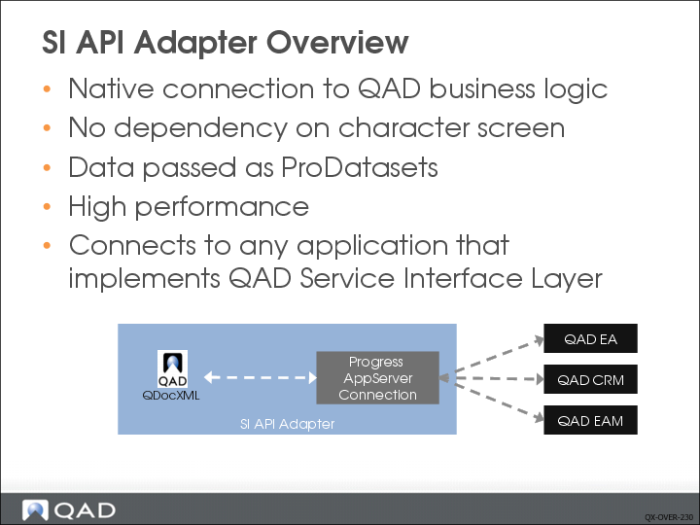
The SI API adapter enables the use of business logic implemented by the QAD reference architecture, which separates the user interface from the business logic. These APIs are invoked by using standard functions provided by the Progress AppServer. Because these APIs do not rely on the user interface, they are more efficient than the UI APIs.
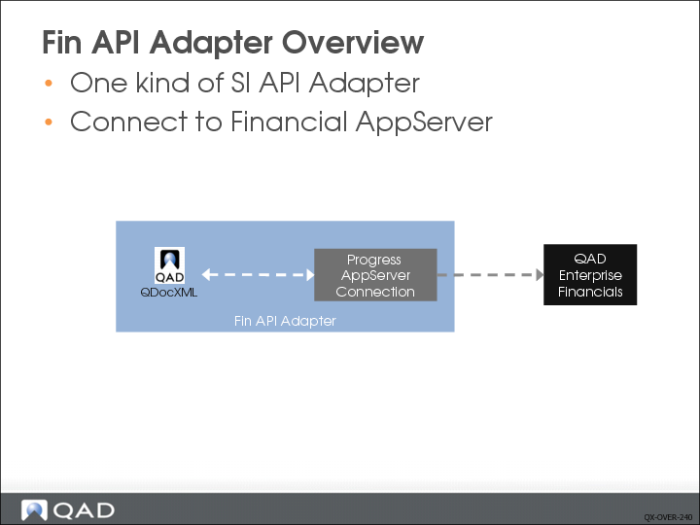
The Fin API adapter is one kind of SI API adapter but is used for QAD Enterprise Financials. Fin API adapter is only available for QADEE, which includes QAD Enterprise Financials.
Requests and responses are passed to––and received from––QXI in a QDoc, which is a QAD-proprietary format XML document. QDocs include application data and any other data required to facilitate processing. QDocs define the interface to the application function and define a contract for the API.
QDocs
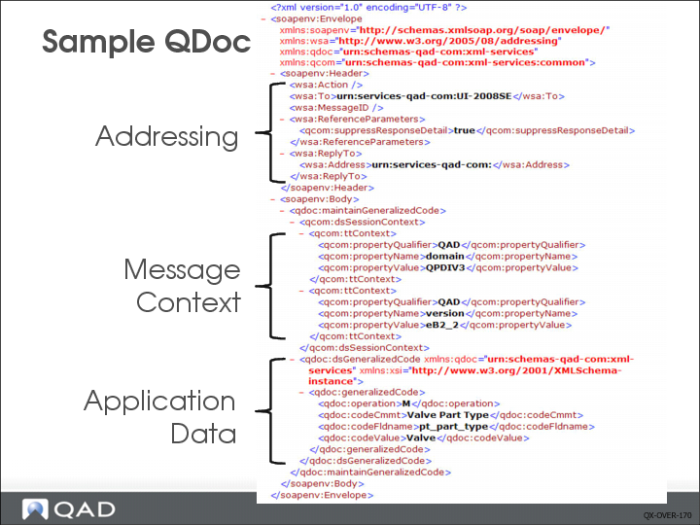
QXI loads data into QAD Enterprise Applications via Web service calls; every request and response is exchanged as a SOAP message. A sample QDoc SOAP Message processed by QXtend Inbound is shown in the picture above. A QDoc has three important areas:
Addressing
Describes the application that sent the data and the destination of the request. The destination is a receiver and identifies a specific instance of QAD EA that will receive the data in the request.
Message Context
Provides the context in which the message should be processed. This section contains information such as the QAD EA Domain and the actual version of the QDoc being processed.
Application Data
Contains the data that gets loaded into the application. The data here controls which data item gets updated and the data that gets loaded into the receiving application.
Web Service
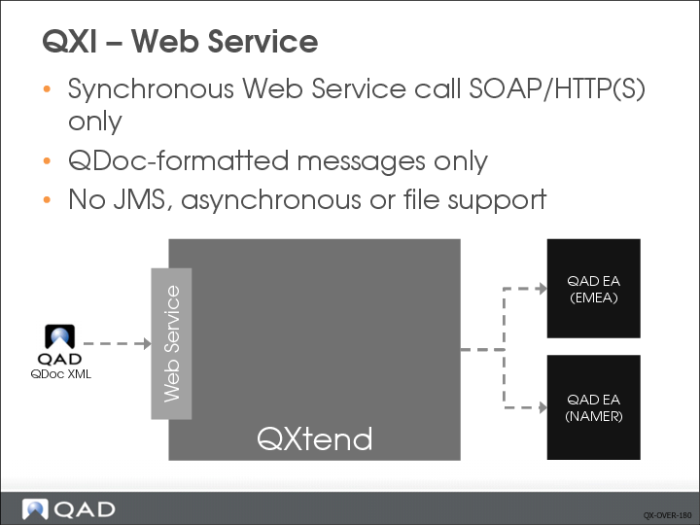
QXtend Inbound processes requests by passing correctly formatted QDoc SOAP messages over an HTTP connection. QXtend only supports the web service type SOAP/HTTP(s). SOAP is a standard way of formatting the request and has three components:
• SOAP envelope, which contains the message. This is like an envelope used to send a traditional letter.
• SOAP header, which contains the addressing information that identifies the sender and receiver of the message. The SOAP header is mandatory in the QDocs specification. This is like the address required when posting a traditional letter.
• SOAP body, which contains the data—customer, supplier, item, and so on—to load into the target application. To continue the metaphor of the traditional letter, the SOAP body is the letter included in the envelope.
QXtend does not natively support JMS, asynchronous messaging, or processing operating system files. Many different mechanisms could be used to get data into an application, and QXtend could not natively support every option—this is not where the value of QXtend is realized. Numerous products support many different integration methods, and QXtend has been designed to work seamlessly with these types of application. Sonic ESB, WebMethods, Web Sphere, Sun Jcaps, and Biz Talk are leading ESB/EAI tools that specialize in this area. All leading EAI/ESB tools can call Web services and therefore can work with QXtend. Many customers use QXtend successfully with several EAI/ESB tools.
Receivers
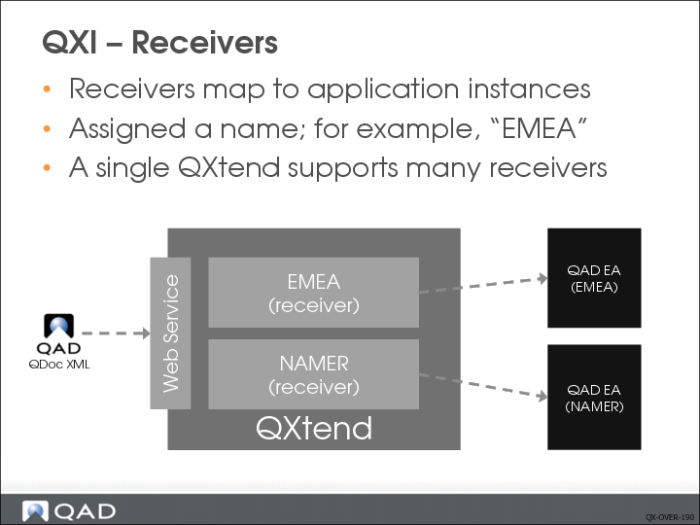
QXtend provides a centralized integration hub that is not tied to any specific QAD Enterprise Applications version. The receiver in QXI identifies the QAD Enterprise Application instance; the instance could be core modules or add-on modules that use QXtend, such as QAD EAM and QAD CRM.
The slide above shows two receivers; each receiver is a different instance of the core QAD Enterprise Application suite. One instance serves North America, the other serves EMEA. These are two entirely separate instances of the software, but both are connected through a single QXtend instance. The versions of the NAMER and EMEA do not have to be identical as QXtend supports many versions.
The name of the receiver is a critical piece of information that must be supplied in any request that is processed. If the receiver is not in the request—or if the receiver is invalid—the message is not processed and an exception is returned to the caller as a SOAP fault.
If a request is intended for the NAMER receiver, the following must be included in the SOAP header:
<wsa:To>NAMER</wsa:To>
Note: The receiver name in the request QDoc is case-sensitive, so the name in the request and the name of the receiver in QXtend must be identical.
Connection Pools
QXI provides an easily managed multi-threaded environment, meaning that multiple requests can be processed simultaneously. CIM and other solutions that are Progress-based do not offer native multi-threading and require many processes to be managed manually. Through the connection pool concept, QXtend can provide a easily managed layer that facilitates the processing of simultaneous requests.
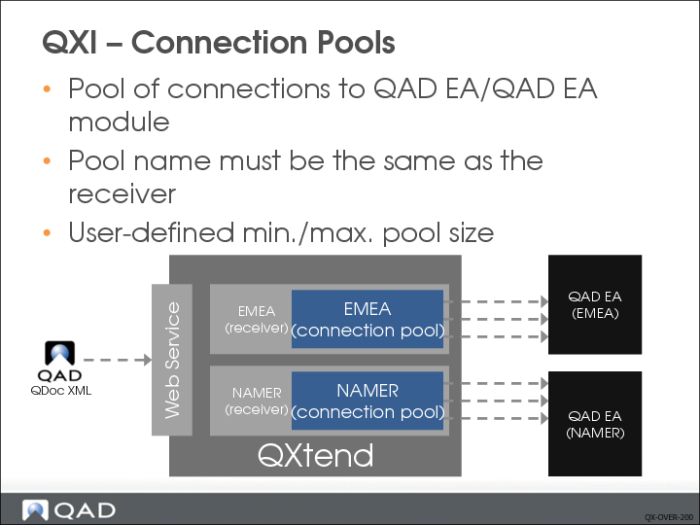
Receivers must have at least one connection pool associated with them, but can have multiple connection pools of different types. Connection pools are assigned a name that must match the name of the receiver that the connection pool is for. Since QXI is case-sensitive, the case of the name must also match.
The Connection Pool holds a pool of sessions connected to an instance of QAD Enterprise Applications. These connections are used to pass data from QXI to the QAD EA instance. When a connection pool is created, connection parameters must be configured to enable the connection between QXI and QAD EA to be established. These parameters include:
• User Name
• Password
• Instance Location (host, port, and so on)
• Minimum Pool Size
• Maximum Pool Size
Connection parameters control the behavior of the connection pool. The Minimum Pool Size and Maximum Pool Size control the multi-threaded processing of QXtend. When QXI starts, it builds the connection pool and creates the minimum number of connections into QAD EA. As requests are processed, QXI tries to keep the minimum number of connections available and increases the connections available in the pool until it reaches the maximum pool size.
The connection pool controls the number of requests that can be processed simultaneously into a QAD EA instance.
Adapters
Adapters are another fundamental component of QXI. An adapter controls access to the APIs in QAD EA. The way in which an API is implemented affects how the API is accessed. As technology changes, new ways of writing APIs evolve, some of which are incompatible with previous approaches. The use of adapters in QXI allows QXtend to shield users from the effects of changes in technology: as a new method is implemented by QAD, QXtend simply provides a new adapter for the new method. This provides value to customers as they can continue to use a consistent approach; QXtend handles the calling of the APIs, thus abstracting the API implementation from the calling application.
As described, a receiver can have one or more connection pools; each connection pool has a type. The type of the connection pool is linked to the adapter. As shown above, the EMEA receiver has three connection pools: one for the UI API adapter, one for the SI API adapter and the other one for Fin API adapter. This allows receivers to process requests to different types of API and the API type is not important to the caller they are just calling QXtend.
The adapter concept has already proved invaluable to QAD. QXtend currently supports three primary adapters: the UI API adapter, the SI API adapter and the Fin API adapter. When first released, QXtend supported the UI API adapter primarily, which uses a telnet or ssh connection to the character screens and loads data by simulating the actions of a user. However, the performance of the UI API adapter does not meet some high volume requirements placed on applications today.
The SI API adapter was introduced into QXtend in the 1.4 release and provides a mechanism for executing Progress business logic that resides on a Progress AppServer. The SI adapter does not rely on the user interface to enter data. The SI API supports high volumes and is also supported by EAM, and CRM modules. Using adapters in QXtend has protected customers from the major changes that have been implemented to QAD EA.
The Fin API adapter is one kind of SI API adapter but is supported by the Enterprise Financials.
User Interface Adapter
The UI API adapter covers almost all core QAD Enterprise Applications by providing a mechanism that loads data through the character screens that a user usually employs to enter data into the system. This approach does not require a change to the implementation model used and works with all versions of QAD Enterprise Applications from eB onwards. The adapter performs the actions that a user would usually perform to load data into the applications. As such, all business rules that are normally enforced—including generalized code validation—are also enforced as data is loaded via the UI API adapter.
Data is sent from the UI API adapter to the character screen field by field; the current position in the QDoc XML request is maintained by the adapter. If an application error occurs as data from the QDoc is entered into the application, the error is trapped immediately and mapped back to the exact field in the QDoc that caused the error. That field, in turn, is mapped back to the exact location in the QDoc request XML. A response QDoc is generated that contains the details of the exception and the context of the error, which help identify the exact location of the problematic data.
The application character screen drives the integration requesting the data from QXI, and therefore when new screens or pop-up windows appear, QXtend can handle these screens and will not break when a previously unseen frame is encountered. The data pull approach provides a more robust mechanism than the error prone CIM alternative, as well as an error handling/reporting and record lock processing.
A major component of the UI API adapter is the event mechanism. As described previously, the adapter mimics the actions of a user. Some application screens have complex interactions and do not always follow the same rules. For example, usually the F4 key is used to back out; however, sometimes F4 means continue. The event mechanism enables the adapter to cope with these variations by storing the necessary navigation actions that are required to navigate successfully through the user interface of the function. The events are created using the QGen tool to map the screen and record the events; the events are then used when processing a request through the UI API adapter.
Service Interface (SI) Adapter
The SI adapter provides an adapter to Progress-based business services (APIs) that have followed the QAD Service Interface implementation guidelines. The service interface provides a set of infrastructure components that allow QAD to follow a standard pattern using ProDatasets from Progress OpenEdge. QAD modules that support the service interface can be called easily from QXtend without the need for new adapters to be created; this also enables other modules to move their APIs to the service interface and then also have those APIs available through QXtend.
The SI adapter is different from the UI API adapter as it does not use character screens. Instead APIs are structured as pure business logic and do not execute any UI logic as part of the API. Removing the dependency on the character screens allows the SI adapter to outperform the UI API adapter. Data is sent to the API in one message rather than field by field, all business rules are executed, and a response is returned to QXI. In turn, QXI builds a response QDoc that is sent as the response to the Web Service call.
QAD does not provide all the APIs since this would require existing application logic to be restructured to separate the user interface and the business logic. This restructuring is a time-consuming process; consequently using the UI API adapter allows QAD application logic to be restructured in a phased approach, starting with QAD 2008 EE, which makes the APIs available through the QXtend SI API Adapter.
Other QAD modules such as QAD EAM and QAD CRM also implement the service interface.
Fin API Adapter
Fin API Adapter is one kind of SI API Adapter which is used by QAD Enterprise Financials. When connecting to QAD EE, it will require creating two separated SI API Adapters to connect to qadsi and qadfin AppServers. QXtend cannot have two SIAPI connection pools using the same pool name. So Fin API Adapter was introduced into QXtend in 1.6 release to connect to Financial AppServer.