XML Import and Export
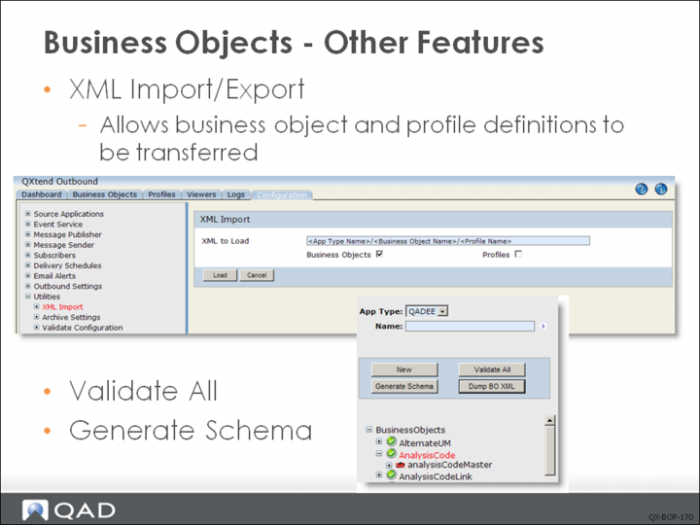
Using the XML Import feature under the Utilities node in the Configuration tab, you can import XML documents. This is required during initial system implementation to populate the database with QAD-supplied default data, and can be used to transfer XML business object and profile definitions from one QXO instance to another.
You can use the Dump BO XML button on the Business Object screen to export the definition to an XML file along with any profiles associated with the business object. These XML files can be loaded into another instance of QXO using the XML Import utility on the Configuration tab (Configuration|Utilities|XML Import).
You can use the Validate All button to validate all business objects under the selected source application type. If there are many business objects, the validation process may take a few minutes. This function is mainly designed for QXtend upgrade and migration since after upgrade/migration all business objects are not validated.
Use the Generate Schema button to generate the XML schema (.xsd file) from the business object for other software to validate its structure.
Predefined Business Objects
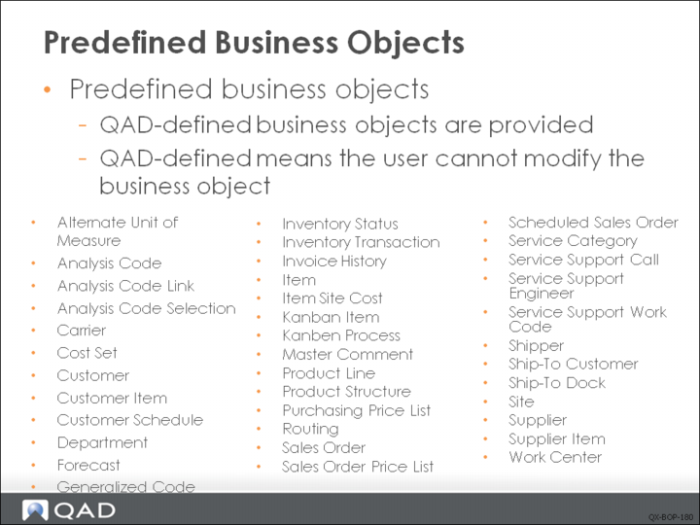
QAD-defined business objects cannot be modified. If you want to customize these object, first copy the object, rename it, and then save the definition. You can then select the copied object and click Edit to modify the object as required.
QXtend comes with many predefined business objects. Here are just part of them that are available for both SE and EE. For EE, there are also over 50 Financials business objects that are started with B, for example, “BBusinessRelation”.
There are some other predefined business objects used for integration with other QAD products, for example, business objects starts with “QADMobile” are used in the integration with QAD Mobile.
Exercise: Business Objects
The following list shows a number of key concepts used in the business objects in QXO. In each statement below, fill in the correct term from the list.
identifier | profile |
data watch | inner join |
join | filter |
tables | related data |
red | |
1 A business object is a set of ______, such as the data that makes up a sales order or a customer record.
2 In the source application, the data that makes up a business object usually resides in a set of related ______,
3 Because not all subscribers need an entire business object, you can tailor which components of a business object to include for a subscriber by defining a ______.
4 When you create a new business object, it must be validated. The system indicates the state of a business object through the use of colors. Unvalidated business objects are indicated with the color ______.
5 If the source application type associated with the business object does not use rowids to identify events, you must use an ______ when defining a data object.
6 ______ indicates that changes to this data object in the source application will not trigger an extraction.
7 A ______ is used to link a data object to its parent, while ______ is a ______ that consists of fields and/or tables that may or may not be part of the current data object.
8 Take SalesOrder as an example, if you want to extract SalesOrder data whose customer is on credit hold, you add ______ to the data object; if you want to extract SalesOrder data whose due date is before 12/31/2010, you add ______ to the data object.