Enabling SSL for Java Clients of an AppServer
To make the Java clients (QXI) work with the SSL-enabled AppServer, bundle the public key to psccerts.jar and deploy the public key bundle to the Java clients.
1 Import the public key (for example, 976f8f0c.0) generated for the AppServer into $DLC/certs/psccerts.jar.
a On the AppServer Host, use Progress on the same host as the AppServer and run the following command:
cd $DLC/certs
$DLC/bin/procertm -i 976f8f0c.0 psccerts.jar
b To check whether the key is included in the psccerts.jar file, list all the certificates in the psccerts.jar file. Run the following command:
$DLC/bin/procertm -l psccerts.jar
Note: If the public key certificate with the same alias name exists in the psccerts.jar file, remove it first and import the new one.
2 Deploy the public key bundle to the Java client.
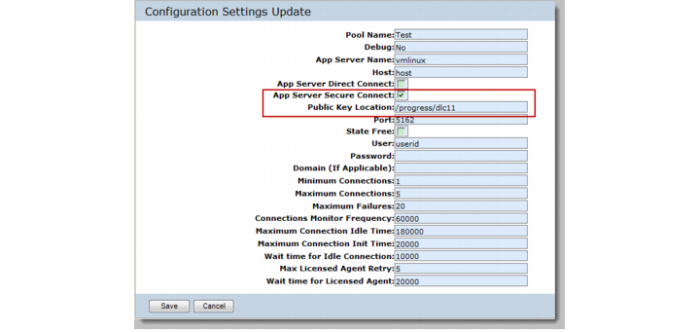
On the Configuration Settings Update page of the SIAPI or Fin API, select the App Server Secure Connect check box to enable the Public Key Location field. Public Key Location is the location on the tomcat host, which contains the certs directory having all the certificates and the psccerts.jar file in it. Then,
• On a one-tier system, the psccerts.jar file is in the $DLC/certs directory. You can specify /progress/dlc11 in the Public Key Location field.
AppServer Secure Connect for SIAPI
• On a two-tier system that has no Progress installed on the Tomcat host, copy the certs directory containing the public key and paste it to a location on the Tomcat host. For example, if you paste it to /home/demo, specify /home/demo in the Public Key Location field.
• For multiple connection pools, if the pools use different certificates, ensure that the public key bundle files (psccerts.jar) are stored in different certs directories.
Note: For Windows system, specify the Public Key Location with the short Windows path. For example, if the directory is c:\Program Files\certs\psccerts.jar, specify the Public Key Location with c:\progra~1.
3 Restart the connection pool when you finish the configuration.
An available idle connection indicates that the connection is successfully established. If you do not see any idle connection, check the qxtendserver.log for errors.