Adding Source Application Databases
Each source application can contain multiple databases, as long as all the databases in the source application type share the same schema.Note: Source application databases are not relevant for source application types that employ DDP.
1 Click the source application in the navigation tree under the source application type. The tree expands to display the source application components.
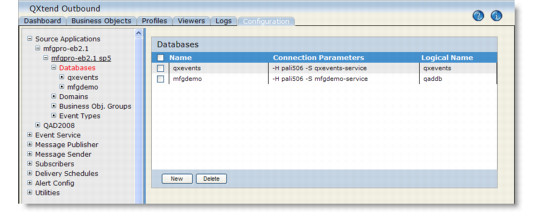
2 Click Databases under the source application. The Databases overview screen displays.
Databases
3 Click New to add a database. You must define the production qaddb databases as well as the qxevents database.
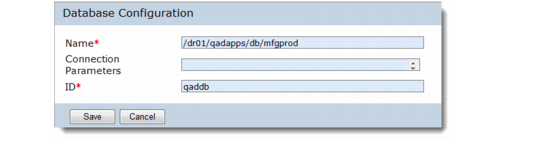
Database Configuration
Name
Specify the physical file name of the source application database (without the .db extension).
Connection Parameters
Specify any Progress connection parameters the system should use to connect to this database. For details, see the Progress System Administration Guide.
ID
Specify the ID of the database connection. For the qaddb and qxevents databases, the ID must be qaddb and qxevents respectively, regardless of their logical database names.
4 Click Save to save the database definition.
5 Repeat these steps for each database in the source application.
Databases are disconnected whenever you modify the database configuration. By default, the database is automatically reconnected when you have finished the modifications and choose Save. If you encounter reconnection errors, refer to QAD QXtend Installation Guide for assistance.You can change the database configuration later, including the connection ID, by following these rules:• Always stop all event service instances before changing the database configuration.
• Restart Outbound AppServers and services after changing the database connection. If the connection ID is changed and it is explicitly used in business objects (for example, joins, filters, and so on), update those business objects.
• Databases (of different source applications) with the same schema must have the same connection ID. Otherwise, the events from some of the source applications cannot be processed.
QXtend Outbound gives error or warning messages when you change the database configuration.