Defining a Message Publisher
Message publishers poll the qxodb database for new data objects created by an event service, as well as for new business objects passed directly to the qxodb database from the QAD EE Financials module.Message publisher services:1 Poll for and identify an eligible data object in qxodb.
2 Identify affected business objects in QXO.
3 Identify applicable profiles.
4 Build an XML QDoc using a profile.
5 Store the QDoc in qxodb.
6 Create a delivery request for each associated subscriber, using the appropriate QDoc syntax for each subscriber.
7 Store the delivery requests in the subscriber’s delivery queue.
As described in QXO Services, the parameters for message publishers are identical to those for event services.1 In the Configuration tab, click Message Publisher in the navigation tree. The Message Publishers overview screen displays.
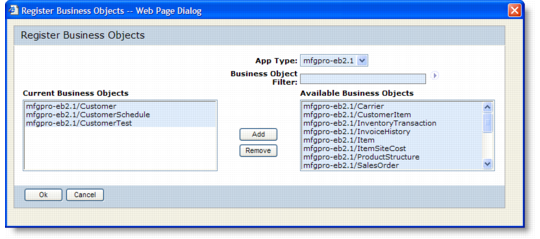
3 Click Lookup to register business objects with this publisher. A lookup displays available and currently assigned business objects. Use the Add and Remove buttons to update the lists.
Business Object Lookup
4 Click OK to save and exit the Register Business Objects screen.
5 Click Save to save the message publisher configuration.