Archiving Using a Cron Job
You can also run the archive feature by using a cron job. In the crontab file, specify the archive program qxoarchive.p. Using a cron job lets you schedule archiving to occur at multiple times per day, if required. Configuring archiving using the Archive Settings screen constrains archiving to occur only once per day on the days you specify.Note: Use the archive service to start or stop the archive routine and to view its current status. You do not have to create an archive service—you just have to enable it. For details on using services, see
Viewing Services Summaries.
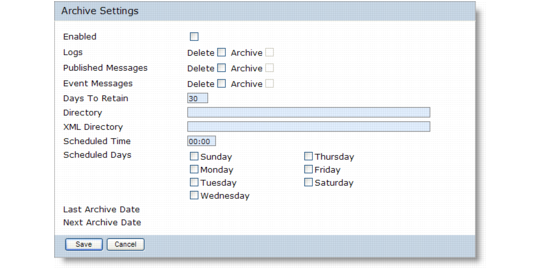
1 In the Configuration tab, click Utilities|Archive Settings in the navigation tree. The Archive Settings overview screen displays.
Archive Settings Configuration
Enabled
Indicates whether the archive routine is enabled. To run the archiving routine this check box must be selected, regardless of whether archiving is configured from the Archive Settings screen or scheduled using a cron job.
Logs
Indicates whether archiving is enabled for logs.
Delete. Indicates whether to delete the archived logs. You must select this check box in order to enable the Archive option.
Archive. This option is enabled when the Delete check box is selected. Indicates whether to archive logs to a file.
Published Messages
Indicates whether archiving is enabled for published messages and associated child data.
Delete. Indicates whether to delete the archived published messages. You must select this check box in order to enable the Archive option.
Archive. This option is enabled when the Delete check box is selected. Indicates whether to archive published messages to a file.
Event Messages
Indicates whether archiving is enabled for event messages and associated child data.
Delete. Indicates whether to delete the archived event messages. You must select this check box in order to enable the Archive option.
Archive. This option is enabled when the Delete check box is selected. Indicates whether to archive event messages to a file.
Days To Retain
Indicates the number of days the data will remain in the QXO database before it is archived. The default value is 30; the maximum value permitted is 999.
Directory
Specify a location for the archive files. This directory contains all archived data except subscriber messages and responses (child data). The directory must exist and be writable before the archive routine is started. If not, the archive routine fails and the failure is logged.
The archive routine outputs the data into a file called
<table-name>.<yyyymmdd>.arc where <table-name> is the name of the application table being archived and <yyyymmdd> is the creation date. If the archive routine is run more than once in a day, any archived data is appended to the end of the existing archive file.
XML Directory
Specify a location for the archived subscriber messages and responses. This directory is populated only if you specify that you want to archive published messages. This directory must exist and be writable. If this field is left blank, by default any data is saved to the location specified in the Directory field.
Scheduled Time
Enter a time to commence the archive routine. Time must be entered in a 24-hour format.
Scheduled Days
Select the days on which to run the archive routine.
Last Archive Date
Displays the date on which the archive routine was last run.
Next Archive Date
Displays the date on which the archive routine is next scheduled to run based on the Archive Settings configuration.