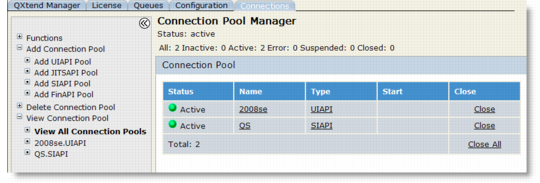
Viewing Connection Pools
You can choose to view connections by status or view all connections.1 In the Connection Pool Manager, choose View Connection Pool if it is not already expanded. The available connection pools display beneath View Connection Pool.
View All Connection Pools
2 Choose an individual connection pool name from the View Connection Pool list to manage a specific pool.
3 For pools in the Processing state, a View link displays in the Close column. Use this feature when processing has stalled. Click View to see the telnet session. Any error or wait-state message displays in the lower portion of the telnet screen.