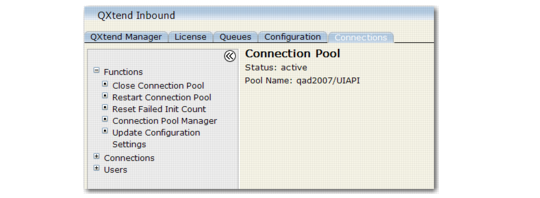
Managing a Connection Pool
Once you select a specific connection pool, the menu options displayed are for the selected connection pool.
Connection Pool Menus
The following options are available from the Functions menu:Close Connection Pool
Closes all connections in the current pool, ending all connections regardless of state or status. You can use Restart Connection Pool to start them up again.
Restart Connection Pool
Closes all the open connections in the current pool, and starts the minimum number of connections as defined in the configuration settings for the pool.
Reset Failed Init Count
The failed initialization count is the number of times the server has attempted to launch a connection unsuccessfully. The number is automatically reset when a successful connection is made.
Connection Pool Manager
Closes the individual Connection Pool interface and returns you to the Connection Pool Manager.
Update Configuration Settings
Opens the configuration settings for the pool. The only difference is that the pool name is not available for editing.
Choose the Connections menu to view the pool of active connections. See
Connection Pool States for information on the individual states. You can view the connections in the following categories:
All
Displays all connections. It is the only view that displays Disconnected and ForceDisconnect statuses.
Busy
Displays connections with Busy, Pause, or Processing status.
Idle
Displays all idle connections.
Initializing
Displays initializing connections.
Choose Refresh to update the screen display. Choose the Close link to close unneeded connections.