DOM Builder Reference
This section describes the DOM Builder, an API for creating QDocs and other XML documents inside QAD Enterprise Applications.Note: The DOM Builder creates QDocs in the 1.0 syntax specification only.
IntroductionExplains how the DOM Builder works. DOM Builder ProceduresDescribes DOM Builder procedures. DOM Builder and Q/LinQExplains how DOM Builder and Q/LinQ are related. QDoc-Specific API MethodsLists and describes QDoc-specific API methods. General XML API MethodsLists and describes general XML API methods. Utility MethodsLists utility methods.Introduction
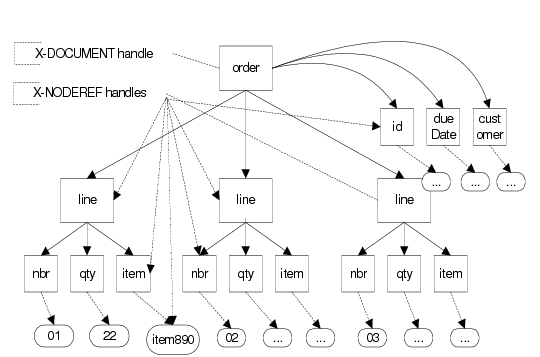
The name DOM Builder comes from the term Document Object Model (DOM), the major industry-standard API for building XML documents. DOM objects are tree-representations of XML documents that contain the parent-child node relationships of XML parent elements, child elements, and attributes and values, letting the software developer navigate from parent nodes to child nodes or vice-versa using designated API methods. Beginning with Progress 9, the Progress 4GL contains language elements that allow XML documents to be represented and manipulated in memory as DOM objects. These XML objects may be constructed, navigated, and parsed node-by-node using particular Progress 4GL methods. The objects are referenced in Progress source code as X-DOCUMENT and X‑NODEREF handles.The following sample illustrates a simple XML document and its partial DOM representation. XML Document and DOM Representation is a graphical representation of this code sample.<order>
<id>ord1234</id>
<dueDate>2003-08-06</dueDate>
<customer>cust567</customer>
<line>
<nbr>01</nbr>
<qty>22</qty>
<item>item890</item>
</line>
<line>
<nbr>02</nbr>
<qty>7</qty>
<item>item123</item>
</line>
<line>
<nbr>03</nbr>
<qty>32</qty>
<item>item456</item>
</line>
</order>
XML Document and DOM Representation
Using the DOM Builder, QAD Enterprise Applications programs can:• Assemble QAD Enterprise Applications data to be placed into an XML document in either character variables or temp-table form.
• Send the information to the DOM Builder one level or one node at a time.
• Obtain the handle of the resulting XML parent node.
Once completed, the entire XML document can be retrieved as either a handle, temp-table, or character value. The QAD Enterprise Applications developer does not have to directly manipulate each XML node using the lower-level XML methods of Progress, as the DOM Builder does so automatically.