Activate the Tables to Synchronize
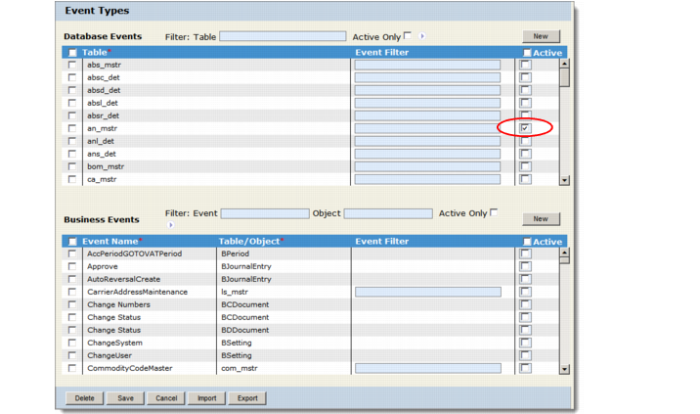
After importing your business objects and profiles, the next step is to activate the event types for the tables in the source application. You use the Event Types screen (Configuration|Source Applications|QADSE|application|Event Types) to activate your event types.
In our scenario the source application will trigger an event when the event service detects that the fcs_sum (Forecast Summary) table has been modified.Important: New customers to QXtend will always use QDoc Version 1.1. QDoc Version 1.0 is described for backward compatibility reasons.
Events Types
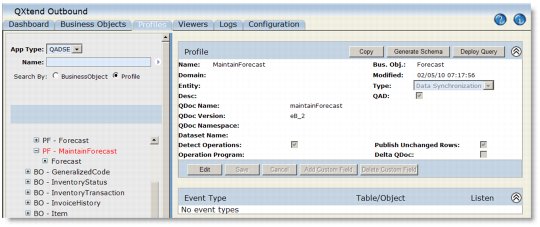
Note that in our scenario, in the Database Triggers section of the Event Types area, the check box in the Active column is selected for the fcs_sum table (indicated).For details, see the section Editing Source Application Event Types.You can check the profiles associated with the Forecast business object. Click the Profiles tab and select the QADSE source application type. Click the Profiles option and perform the search. Expand the Profiles node and select the BO - Forecast business object. Select the PF - MaintainForecast.
DataSync Profiles
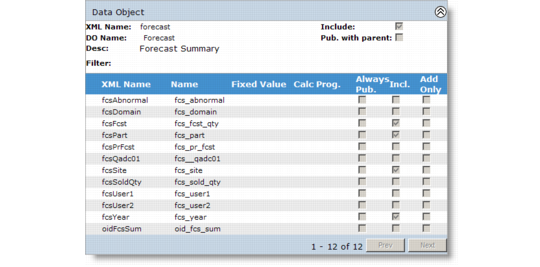
The profile takes the business object and converts it into a QXI QDoc. Click the Forecast data object node to view the Incl column which indicates the fields that will be included in the exported QDoc.
Forecast Data Object