Set Up Your Subscribers
The next step is to set up your subscribers, which involves two steps:• Create a subscriber for each domain.
• Assign profiles to your subscribers.
Create a Subscriber for Each Domain
You configure subscribers using the Configuration Parameters screen (QXO Console|Configuration|Subscribers). In our scenario data is being synchronized between the source domain (demo1) and the destination domain (demo2).In the Configuration Parameters screen, set the Communication Method to QXtend Web Service. Then specify the Tomcat location of QXI, the receiver, and domain. For details on defining a subscriber using the options for the QXtend Web Service method of communication, see QXO Subscribers.Assign Profiles to Your Subscribers
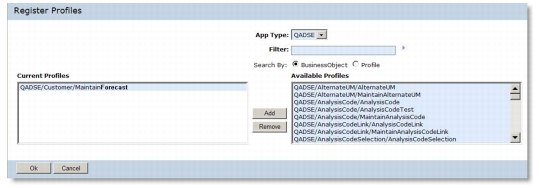
The final step is to assign profiles to your subscribers using the Configuration Parameters screen. Click the Register Profiles button under the Registered Profiles list box and select the profiles used to format QDocs for this subscriber.
Register Profiles
For details see Modifying Profiles.