Updating Program Information
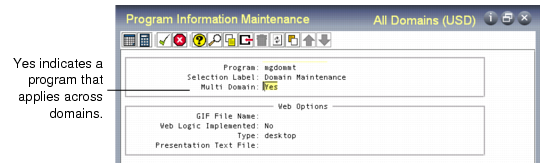
You can use a setting in Program Information Maintenance (36.3.21.1) to control which programs display the string All Domains in the title bar.
• In the character and Windows interfaces, this displays when Header Display Mode is 2 or 3.
• In Desktop, either the domain name or All Domains displays regardless of the Security Control setting.
Note: This field affects all UIs.
Information about all programs is initially loaded into your database during installation with appropriate default settings. You can update the setting for your custom programs or change it if you want the current working domain to continue to display even when a user is updating a table that applies across domains.
See
Programs Updating System-Wide Data for a list of programs that display All Domains.
Note: This change affects what displays on the UI, only. The program continues to update data for all domains.
Program Information Maintenance (36.3.21.1)
Multi Domain
Indicate if this program updates data that applies to all domains in the database.
No: The data referenced by this program is specific to the current working domain. For example, generalized codes apply to each domain separately so Multi Domain is set to No by default for mgcodemt.p.
Yes: The data referenced by this program is not part of a specific domain. For example, country codes apply to the database as a whole so by default Multi Domain is set to Yes by default for adctrymt.p.
When Header Display Mode is 2 or 3 in Security Control and a user invokes a program, the system checks the value of this setting to determine what to display in the program title bar.
• When Multi Domain is No, the short name and base currency of the current working domain display.
• When Multi Domain is Yes, the string All Domains displays in the header to help users easily identify functions that operate across domains.
Note: Base currency of the working domain continues to display.