Setting Up Sequences
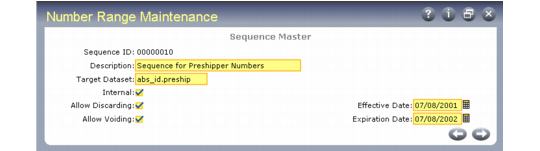
Create sequences and define sequence parameters using Number Range Maintenance (36.2.21.1). NRM uses a unique sequence ID to retrieve data and generate new numbers. Use Sequence Browse (36.2.21.2) to view the defined structure of a sequence.
Number Range Maintenance (36.2.21.1)
Sequence ID
Enter a code uniquely identifying a sequence. Create a new sequence or use Next/Previous to retrieve an existing sequence.
Description
Enter a description of this sequence, up to 40 characters.
Target Dataset
Enter the dataset identifier associated with this sequence. The target dataset can indicate who owns the sequence or where its numbers are used. A sequence owner can be a process, a document, or any other entity that the client program can recognize.
Note: The target dataset could be the name of the principal database field where numbers from the sequence are used.
You cannot create a new sequence that intersects an existing sequence with the same target dataset—creating two sequences that could generate the same sequence number for the same target field.
For example, if sequences A and B both target field so_nbr, they cannot have a common element that could cause conflicts.
The following three target datasets are used with shippers:
• abs_id.shipper is used for sales order shippers.
• abs_id.preship is used by sales order pre-shippers.
• abs_id.mbol is used by master bills of lading.
For Fixed Assets, specify dataset fa_id.
For Logistics Accounting, specify:
• la_so_ship_id for sales order shipments
• la_do_ship_id for distribution order shipments
For Kanban, specify dataset knbd.dispatch_id.
Internal
Specify whether the sequence numbers are supplied by an external source or automatically generated by NRM. Enter Yes if numbers are generated by NRM.
Allow Discarding
Using a number causes it to be registered. This field determines whether a registered number can be discarded, leaving a gap in the sequence.
No (the default): Gaps are not allowed and numbers cannot be discarded from this sequence.
Yes: You can discard previously registered numbers from this sequence by reversing the register operation. NRM then erases all record of the sequence number, and the discarded number is replaced by a gap.
Allow Voiding
Determines whether you can mark a registered number as void.
No (the default): Numbers in this sequence cannot be voided.
Yes: You can void numbers and specify a brief description why. Voiding is recorded as a separate event in the sequence history.
Effective Date
Indicates the earliest date when this sequence can be used.
Expiration Date
Indicates the latest date when this sequence can be used.
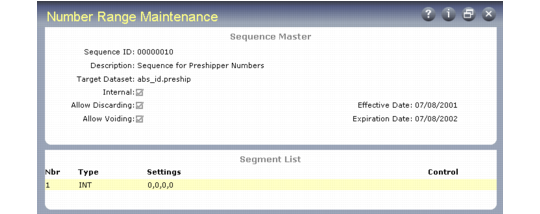
Segment List
After you define the initial parameters for a sequence, Segment List and Editor frames display. The segment list shows the type and settings for each segment defined in the sequence. Segments display in ascending order, based on segment number.
Number Range Maintenance (36.2.21.1), Segment List Frame
Segment Editors
The segment editor used depends on the type of segment being defined. Use the editor to create or modify the segment format definition and assign a new segment number. There are four types of segment editors.
• Fixed segment editor for fixed value segments
• Integer segment editor for incrementing integer segments
• Date segment editor for date-driven segments
• Fiscal segment editor for date-driven segments, relative to fiscal periods
Fixed Segment Editor
Use the fixed segment editor to establish a fixed string value. You can use any printable character except a comma.
Fixed Segment Editor
Integer Segment Editor
Use the integer segment editor to specify the initial, reset, minimum, and maximum values for a segment.
Integer Segment Editor
Date Segment Editor
Use the date segment editor to tell NRM how to display a date component of a sequence number. Specify codes representing date components such as year, month, day. You can add components in any order, with optional delimiters. In the date segment 07/02, a forward slash is the delimiter. You can use any printable character except a comma or another date component as a delimiter.
You can indicate if this segment is a control segment. Changing the value of a control segment causes the incrementing integer segment to reset to its assigned reset value. The new value in the control segment ensures that the sequence numbers generated after resetting are unique within the target dataset.
Date Segment Editor
Fiscal Segment Editor
Use the fiscal segment editor to tell NRM how to display a fiscal date component of a sequence number. Codes represent a component of a fiscal period. Otherwise, this editor is exactly the same as the date segment editor.
Note: You can add fiscal segments only if the sequence has an expiration date.
Fiscal Segment Editor