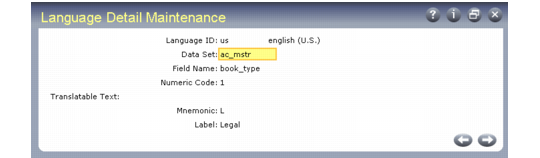
Language Detail Maintenance
Some program options appear on the screen using alphabetic codes or words. Internally, these options are controlled by numeric codes. Mnemonics and labels provided in English may not be appropriate in other languages. Use Language Detail Maintenance (36.4.3) to change, add, and delete mnemonic codes and labels.
Language Detail Maintenance (36.4.3)
Data Set
Enter the program name, a database table name, or an abbreviation of the functionality for a field.
Field
Enter the field name associated with the data set.
Numeric Codes
These are the values used by the programs. A mnemonic code can be assigned for each numeric code. Codes cannot be added or edited.
Mnemonic
Mnemonic codes are already assigned for each field with several system-specified options. These codes can be changed, added, or deleted using this program.
Label
Default labels already exist for the different mnemonic codes. These labels can be changed, added, or deleted using this program.