E-Mail Definition Maintenance
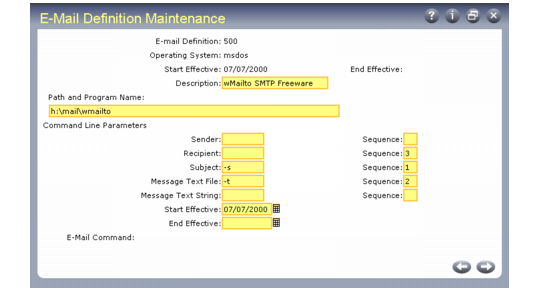
Before you implement E-Mail Definition Maintenance (36.4.20), refer to the e-mail application documentation or consult with your e-mail system administrator to determine if the application you are using provides an operating-system command interface. If it does not, various shareware products provide e-mail command-line interfaces.
E-Mail Definition Maintenance (36.4.20)
E-Mail System
Enter an alphanumeric code for an e-mail system your company uses. This can be a number or a shortened version of the application name. You can use the same code for more than one record to give users access to multiple systems. For example, you can define both a UNIX system and a Windows system with the same code so that a user can log on to either system with the same user ID.
Operating System
Enter the name of the operating system on the user’s computer. This is not necessarily the same operating system as the computer where the databases reside. Valid values are UNIX, MSDOS, and WIN32.
Start Effective
Optionally enter the first date this system is available for use.
Description
Enter a brief description of this system.
Path and Program Name
Enter the complete path to executable e‑mail application file; for instance:
F:\apps\shared\email\blat.exe
End Effective
Enter the last date this system is available for use. This is an optional field.
Command line parameter fields can store parameters or arguments to identify the type of data being passed to the command. The parameter is a prefix, which is followed by the type of data. The UNIX mailx command, for instance, requires that the subject of the message have a -s prefix, as in the following example:
mailx -s "test message"
E-Mail Definition Maintenance defines four parameters: Sender, Recipient, Subject, and Message Text File (or Message Text String). Use the message parameters required by your e-mail system. Only one message field can be used in each e-mail definition.
The Sequence fields control the order in which the Sender, Recipient, Subject, and Message Text parameters appear in the command line. Some e-mail systems require these parameters in a specific order. If your system does not use one of the parameters, leaving both the Parameter and Sequence fields blank omits that parameter from the command line.
If you enter a parameter without a sequence, the parameter is not included on the command line. If you enter a sequence without a parameter, the system skips this parameter and creates the command.
The E-Mail Command field displays the system-built Path and Program Name, Parameters, and Sequence.
When you complete the setup for your e-mail system, you are prompted to send a test message. The default addressee is your log-on user ID. If you have not yet entered your e-mail address in User Maintenance, the system prompts you for an address.