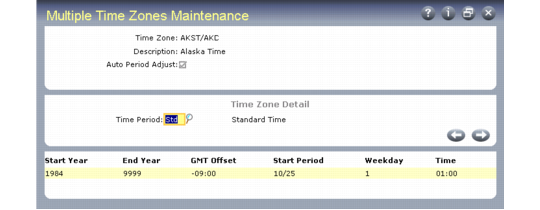
Multiple Time Zones Maintenance
Use Multiple Time Zones Maintenance (36.16.22.1) to define and modify time zones.
Note: The Multiple Time Zones Load Utility creates sample data upon which you can base your own time zones.
This program supports two ways of setting up a time zone:
• In the simplest format, you can base a time zone on an offset from GMT.
• The system can also track daylight savings time adjustments from a baseline you set.
If you choose the second approach, you must specify when the change in time occurs. You can also use effective dates with time zone information, if the start and end points for daylight savings time only apply for a range of years.
After you define the time zones, you can generate reports with Multiple Time Zones Report (36.16.22.3).
Multiple Time Zones Maintenance (36.16.22.1)
Time Zone
Enter an eight-character label identifying a time zone.
Description
Enter up to 40 characters describing this time zone. The description appears in the time zone lookup.
Auto Period Adjust
This field indicates whether the system should adjust the time zone you are defining for a given period—usually daylight savings time or its equivalent.
Yes: Define the period to be adjusted in the subsequent detail frame.
No: Time Period defaults to STD (standard). You cannot change it.
Time Period
This field is editable if Auto Period Adjust is Yes. Valid choices are STD for standard time, Day for daylight-saving time, and Sum for summer time. You can define details for two periods: a standard period, and a special adjusted period for daylight savings or its equivalent. This field determines which of the detail fields are required.
Note: Set up values for time period as language details to reflect the terms you use.
Start Year
Enter the beginning year of the range associated with this time zone definition. In some countries, the implementation of time zones varies from year to year. Using start and end dates, you can set up multiple records effective at different periods of time.
End Year
Enter the ending year of the range associated with this time zone definition. If you do not know when the current definition ceases to be effective, use an end year such as 9999.
GMT Offset
Enter the actual offset in hours and minutes from Greenwich mean time (GMT) for this time zone. Enter this number with either a plus sign (+) or minus sign (–) indicating the direction of the offset.
GMT is the base for establishing the relationships among time zones and is never affected by daylight-saving time adjustments.
Start Period
When Auto Period Adjust is Yes, enter the first day of the week when the change of time occurs in MM/DD format. For the United States, daylight-saving time normally begins on the first Sunday in April—identified by a start date of 04/01—and ends on the last Sunday in October—identified by a start date of 10/25.
Note: Use the MM/DD format regardless of the date format you use.
This field, in conjunction with the Weekday and Time fields, identifies precisely when the time change occurs.
Note: In the U.S., time changes always occur on Sunday (1).
Weekday
When Auto Period Adjust is Yes, enter a number from 0 to 7 indicating the day of the week—identified by the Start Period field—when the time change occurs.
• Enter 0 if the change occurs on the date in the Start Date field, regardless of the day of the week on which it falls.
• Enter a number in the range 1-7 corresponding to Sunday through Saturday if the change occurs on a certain day of the week.
Time
When Auto Period Adjust is Yes, enter the exact time of day—identified by the Start Period and Weekday fields—using a 24‑hour clock, when the time change occurs. Enter this time in standard time.
In the United States, enter 02:00 when switching from standard time to daylight-saving time, but 01:00 when switching from daylight savings time back to standard.