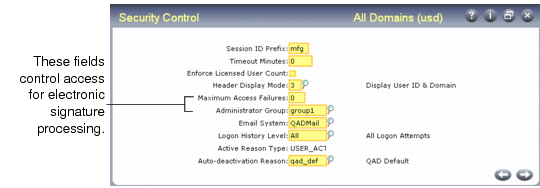
Review Security Control Settings
To guard against attempts by unauthorized individuals to apply electronic signatures using another user’s ID, signature validation logic is similar to that used in the log-in process.
Review Security Control (36.3.24) to see how log-in security is defined in terms of password structure and use rules.
See
Users and Security for information on setting up and using log-in security.
Security Control (36.3.24)
Two fields directly control how the system manages unsuccessful electronic signature attempts:
• Max Access Failures indicates how many consecutive unsuccessful signature attempts cause the user’s session to terminate, deactivate the account, and inform the administrator group of a potential unauthorized access attempt.
• Administrator Group is the name of the user group—defined in User Group Maintenance (36.3.4)—whose members are notified by e-mail when a session is terminated because of excessive unsuccessful signature attempts. The system also sends e-mail to this group when a signature profile is activated. See
E-Mail Notifications.