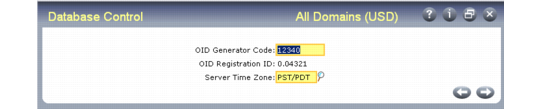
Specify the OID Generator Code
During installation or upgrade conversion, the system prompts you to enter the OID generator code. You can choose any code that you want. However, Progress Software Corporation offers its customers the opportunity to register for unique IDs so other companies will not use the same number, maintaining uniqueness world wide.
QAD highly recommends that you obtain a code by registering each of your databases for a Dynamics Site Number from Progress Software Corporation. For details and registration, see the information at the following Progress site:
In a multiple-database environment, you should obtain an ID for each database. Each qaddb database is assigned its own ID so that the ID values remain unique even when records are merged into one database.
You can use Database Control (36.24) to change the generator code for a particular database. Modifying the OID Generator Code does not change the OID values for existing records. After you make the change, the OID values for all new records will include the new generator code.
Database Control (36.24)
Based on the OID generator code, the OID fields in the database are populated using an algorithm that ensures uniqueness across all records, tables, and databases within the company. The value stored in the OID field for each record has the following decimal format:
<date><seq_value>.<registration_id>
Where:
<date> is the server date with format yyymmdd.
<seq_value> is obtained from a Progress database sequence.
<registration_id> identifies the origin of the OID value.
The registration ID is derived from the OID generator code by reversing the digits of the generator code value and placing the decimal point in front of the result.